
Slidario Pro adds Instagram-style stories to WooCommerce: a row of round bubbles opens full-screen stories with photos or short videos, a product tag on the image and a product card with an Add button, so shoppers add to the cart without leaving the story.
This feature is part of Slidario Pro and works while your Pro license is active. In the free plugin it shows with a PRO badge.

Two styles
| Style | How it works |
|---|---|
| Story circles | You add the slides yourself: photos or short MP4 videos, each with an optional product. |
| Shoppable story | Stories are built from your products automatically: on sale, featured, best selling or recently added (1–30 stories). |
Make a story slider
- Create a slider and choose Story.
- Pick Story circles or Shoppable story.
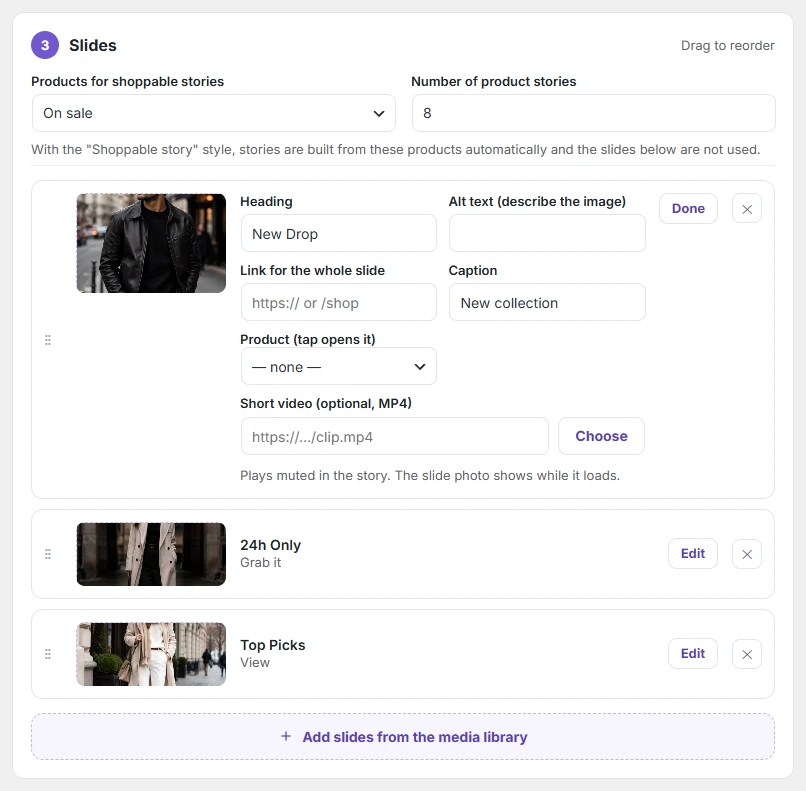
- For Shoppable story: choose Products for shoppable stories and the Number of product stories.
- For Story circles: add slides from the media library. Click Edit on a slide to set its heading, button, link, Product (tap opens it) and an optional Short video (MP4).
- Set Time per story in Settings → Navigation and publish.
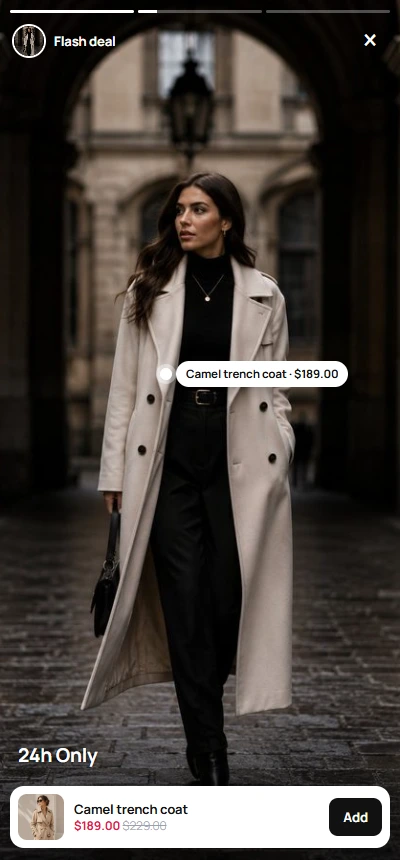
What shoppers see
- Full-screen viewer with progress bars; tap or use the arrow keys to move, Escape to close.
- Videos play muted with a sound button; the progress bar follows the video.
- The product card shows the photo, price, old price, how many options there are, and Add (or View for products with options).
- Stories a visitor has watched turn grey.