
MCP (Model Context Protocol) lets an AI assistant such as Claude or ChatGPT connect to your site. Then you ask in plain words, for example “How visible is my brand in AI this week?”, and it answers from this plugin’s data, without you clicking through reports.
Requirements
- WordPress 6.9 or later (it includes the Abilities API).
- The free MCP Adapter plugin by WordPress, active. It is on GitHub, not in the WordPress plugin directory: download
mcp-adapter.zipand upload it in Plugins → Add New Plugin → Upload Plugin. - HTTPS on your site (WordPress offers Application Passwords only on HTTPS).
- An AI assistant that can connect to MCP servers.
Where to find it
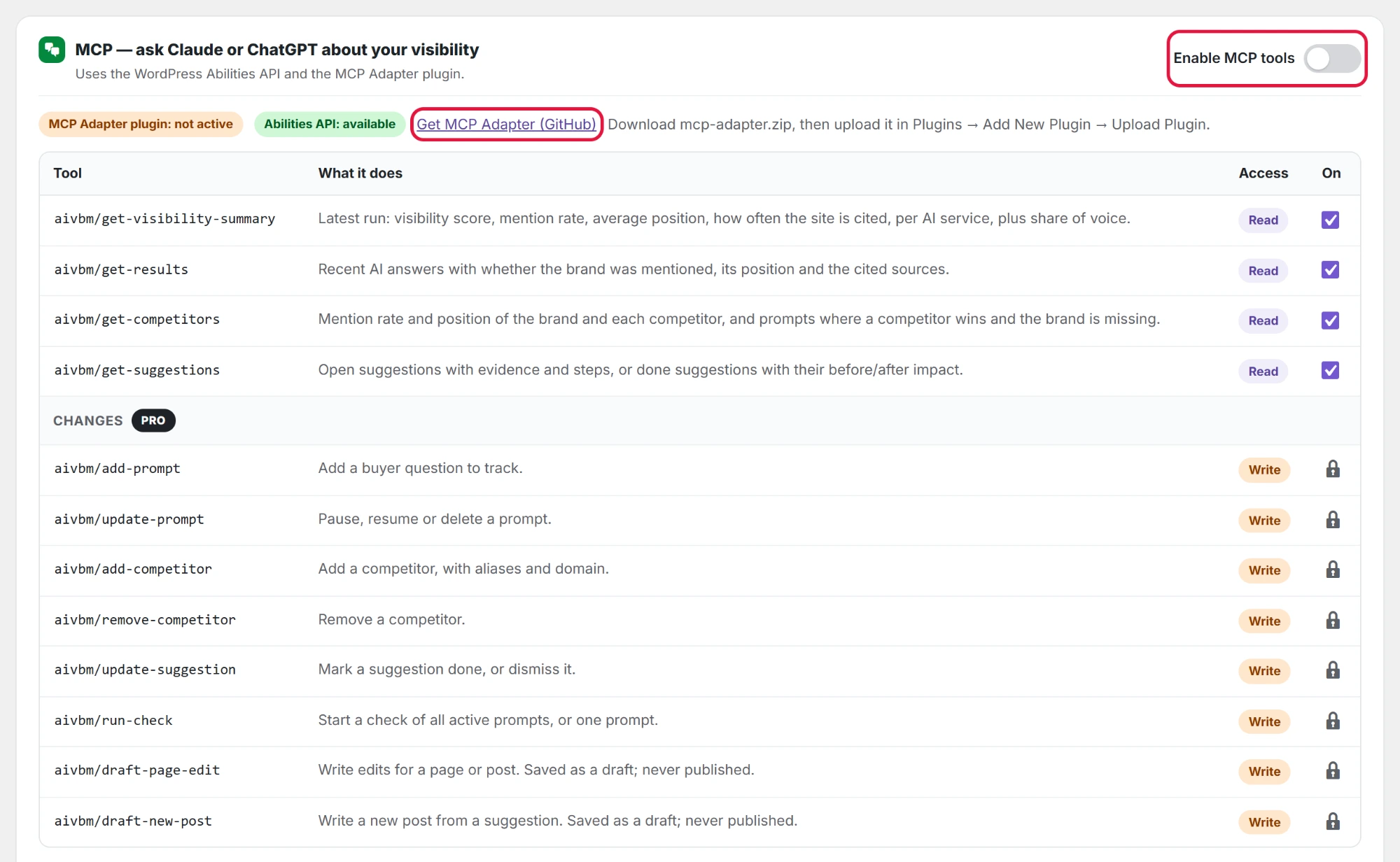
Go to AI Visibility → Settings and scroll to MCP — ask Claude or ChatGPT about your visibility. Two labels at the top show what is ready: MCP Adapter plugin: active or not active, and Abilities API: available or needs WordPress 6.9+.
Set it up
- If the label says MCP Adapter plugin: not active, click Get MCP Adapter (GitHub), download the zip, then upload and activate it in Plugins → Add New Plugin → Upload Plugin.
- Switch on Enable MCP tools and click Save settings.
- In the tools table, keep the tools you want the assistant to use ticked.
- Under Connect, click Copy URL to copy the MCP server URL.
- Create an Application Password for an administrator in Users → Profile → Application Passwords.
- In your AI assistant, add a new MCP server (connector) with the URL you copied, and sign in with the administrator’s username and the Application Password.
Read tools (free)
| Tool | What it does |
|---|---|
aivbm/get-visibility-summary | Latest run: visibility score, mention rate, average position, how often the site is cited, per AI service, plus share of voice. |
aivbm/get-results | Recent AI answers with whether the brand was mentioned, its position and the cited sources. Can be limited to one AI service. |
aivbm/get-competitors | Mention rate and position of the brand and each competitor, and prompts where a competitor wins. |
aivbm/get-suggestions | Open suggestions with evidence, steps and a writing brief, or done suggestions with their impact. |
Pro tools: read pages and make changes PRO
Pro adds one tool that reads your pages and eight tools that make changes. Each change tool is off until you tick it, and every change waits for your approval on the Approvals page before anything happens. In the free version they show in the table with a lock.
| Tool | What it does |
|---|---|
aivbm/get-page | Reads a page or post, or lists them. Used before a page edit; it changes nothing. |
aivbm/add-prompt | Adds a buyer question to track, with an optional country. |
aivbm/update-prompt | Pauses, resumes or deletes a prompt. |
aivbm/add-competitor | Adds a competitor, with other names and website. |
aivbm/remove-competitor | Removes a competitor. |
aivbm/update-suggestion | Marks a suggestion done, or dismisses it. |
aivbm/run-check | Starts a check of all active prompts, or one prompt. Counts toward your monthly API call limit. |
aivbm/draft-page-edit | Writes edits for a page or post. Saved as a draft; never published. |
aivbm/draft-new-post | Writes a new post or page, for example from a writing brief. Saved as a draft; never published. |
With MCP Adapter 0.7, the assistant sees three general tools (discover, get info, execute) and finds this plugin’s tools through them. You do not need to do anything; just ask in plain words.
Questions to ask
- How visible is my brand in AI this week, and what changed?
- Which competitor does Perplexity recommend most, and for which questions?
- What are my top three suggestions right now?
- Write the page for my top content suggestion. PRO (waits for your approval)
The writing brief is included in get-suggestions, so even in the free version the assistant can write the page for you to paste.