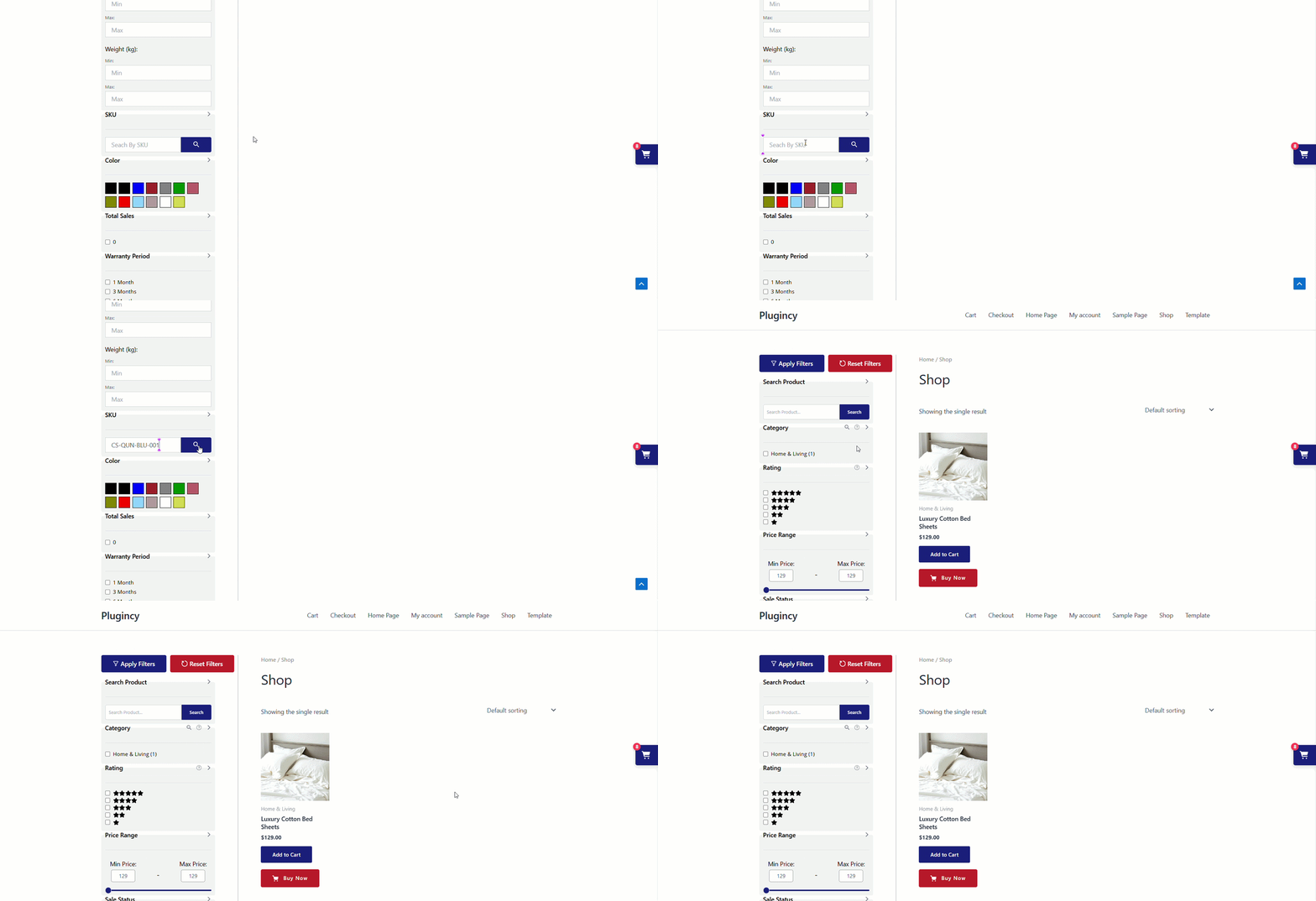
The SKU Filter allows customers to filter WooCommerce products by their Stock Keeping Unit (SKU). This is useful for stores where customers, staff, wholesalers, or B2B buyers search products using exact product codes instead of browsing by category, attribute, or price.
With Dynamic AJAX Product Filters for WooCommerce, you can add an SKU field to your product filter form. Customers can enter a product SKU and instantly narrow down matching products using AJAX.
The SKU filter can be displayed as a simple input field, an input with a search button, or an input with a search icon depending on the layout you choose from the style settings.
Step 1: Add SKU Values to WooCommerce Products
Before using the SKU filter, make sure your WooCommerce products have SKU values.
- Go to your WordPress Dashboard.
- Navigate to Products > All Products.
- Edit the product where you want to add or check the SKU.
- Go to the Product data section.
- Open the Inventory tab.
- Enter the product SKU in the SKU field.
- Click Update or Publish.
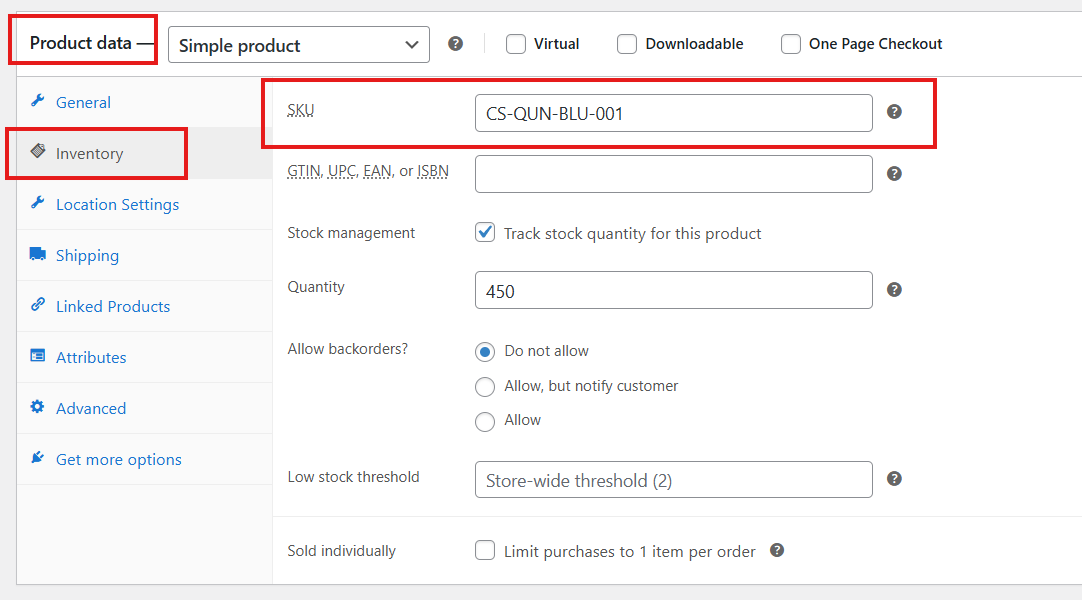
Repeat this for the products you want customers to find by SKU.
Step 2: Enable the SKU Filter
After adding SKU values to products, enable the SKU filter from the filter form settings.
- Go to Product Filters > Form Manage in your WordPress dashboard.
- Find the SKU option.
- Turn the Show SKU option on if you want to show it in the filter widget.
- Turn it off if you want to hide the SKU filter.
- Click Save Changes.
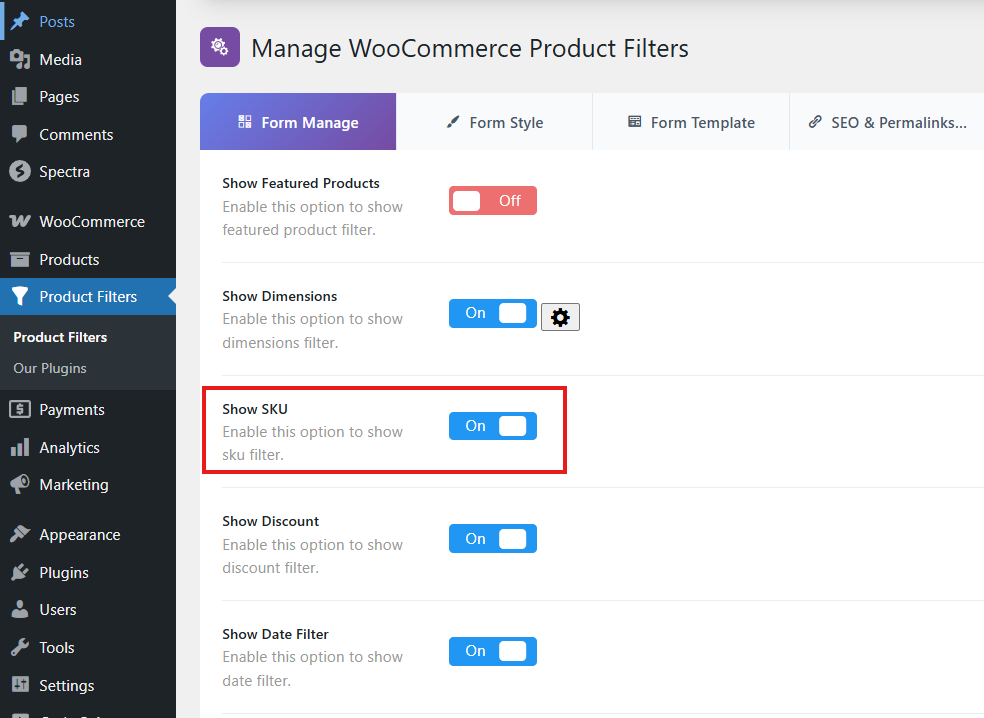
Once enabled, the SKU filter becomes available in the product filter form.
Step 3: Customize the SKU Filter Design
Before customizing, ensure that the SKU filter is enabled in your store.
- From your WordPress dashboard, go to Product Filters > Form Style.
- From the Configure Style for dropdown, choose SKU.
- Choose the SKU layout you want to use. There are three display styles:
- Input: Displays a simple SKU input field.
- SKU Search: Displays an SKU input field with a visible search button.
- SKU Icon Search: Displays an SKU input field with a search icon button.
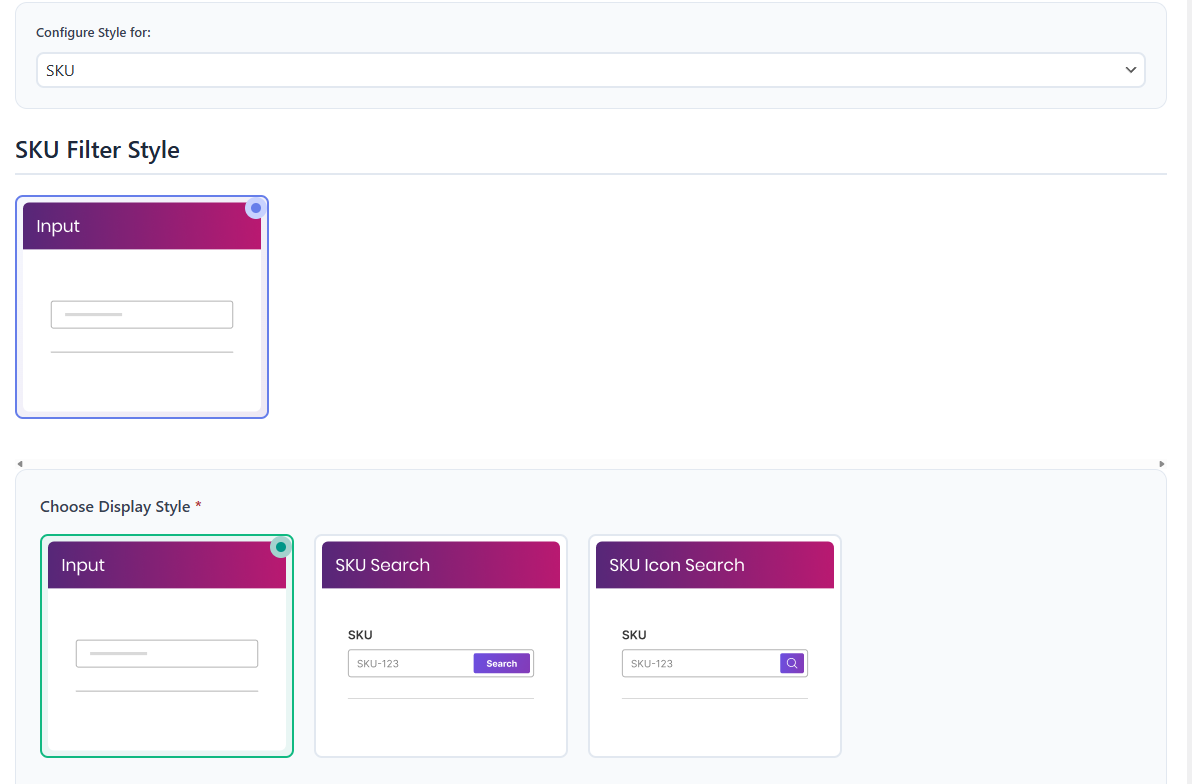
- Customize the placeholder text for the SKU input field if desired.
- Click Save or Save Changes.
Use the simple Input layout when you want a clean field-only design. Use Search Button when you want the action to be more obvious. Use Icon Search when you want a compact modern search layout.
SKU Text Settings
You can customize the text shown in the SKU filter.
- Widget Title: Set the frontend title for the SKU filter.
- Placeholder: Set the placeholder text shown inside the SKU input field.
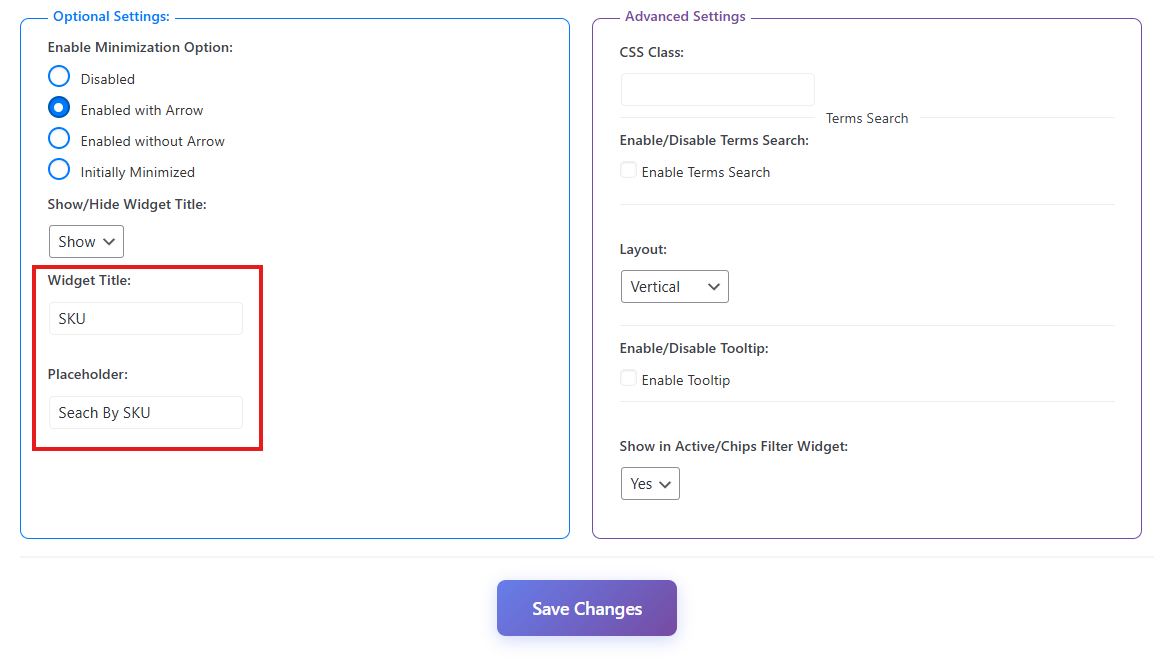
Example placeholder text:
Enter SKU...
Optional Settings
The optional settings section controls the behavior and display of the SKU widget.
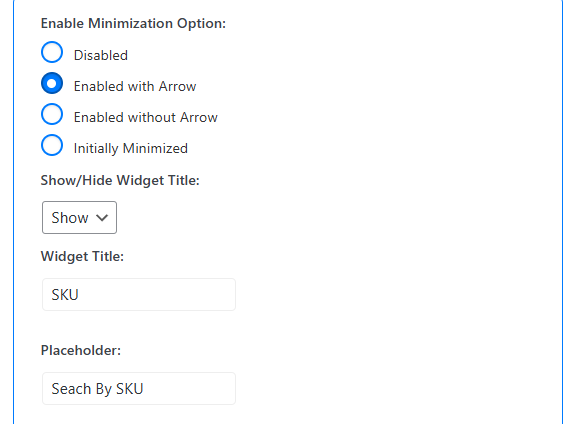
Enable Minimization Option
Controls whether the SKU widget can be collapsed on the frontend.
- Disabled: The SKU filter always stays expanded.
- Enabled with Arrow: Customers can collapse or expand the filter using an arrow icon.
- Enabled without Arrow: Customers can collapse or expand the filter without showing an arrow icon.
- Initially Minimized: The SKU filter loads in a collapsed state.
Show in Active / Chips Filter Widget
Enable this option if you want selected SKU filter values to appear in the Active Filters or Chips widget. This helps customers see and remove the active SKU filter easily.
Show / Hide Widget Title
Controls whether the SKU filter title is shown on the frontend.
- Show: Display the SKU widget title.
- Hide: Hide the SKU widget title.
Widget Title
Set a custom title for the SKU filter widget. For example, you can use:
Search by SKU
Placeholder
Set the placeholder text shown inside the SKU input field. For example:
Enter SKU...
After customizing the SKU widget, click Save to apply your changes.
Step 4: Display the Product Filter with the Block Editor
You can display the product filter on any page using the WordPress block editor.
Use the main filter shortcode:
[plugincy_filters]
Add the filter to a page
- Go to Pages and edit the page where you want to show the filter.
- Click the + icon to add a new block.
- Search for Shortcode.
- Add the Shortcode block.
- Paste
[plugincy_filters]into the block. - Click Update or Publish.
You can also place the shortcode inside a block-based widget area, sidebar, archive template, or Site Editor template if your theme supports it.
If you want to show products on the same page, add WooCommerce product display blocks or product shortcodes according to your store layout.
Expected Result
After completing the setup, customers will be able to search or filter products by SKU from the frontend filter widget.
For example, if a customer enters a product SKU, the product list will update and show matching products.
- The SKU filter can help customers quickly find exact products.
- The result updates through AJAX.
- The filter can be displayed as a simple input, search button, or icon search layout.
Example Use Cases
- B2B Stores: Buyers can quickly search products using internal SKU codes.
- Wholesale Stores: Customers can enter known SKU values from catalogs or purchase sheets.
- Large Product Catalogs: Customers can find exact products without browsing many categories.
- Support Teams: Store staff can guide customers to search using a product SKU.
Notes
- Products must have SKU values added in WooCommerce.
- If a product does not have an SKU, it will not be found by the SKU filter.
- Use clear placeholder text so customers understand what to enter.
- Use the Search Button layout if customers may not realize the input field filters products automatically.
- Use the Icon Search layout if you want a compact search design.
- After changing filter settings, clear your cache if you use a caching plugin.
Troubleshooting
SKU Filter is not showing
Please check the following:
- SKU is enabled in Product Filters > Form Manage.
- The filter shortcode is added to the page, sidebar, widget area, or archive template.
- The product filter settings are saved.
- Cache has been cleared.
No products appear after entering an SKU
This usually means the entered SKU does not match any product SKU in WooCommerce. Check that the product has an SKU value in the product Inventory tab and that the customer entered the correct SKU.
Search button or icon is not showing
Go to Product Filters > Form Style, choose SKU, and make sure the selected SKU layout is either Search Button or Icon Search. Save the settings and clear cache if needed.