
The Discount Filter allows customers to filter WooCommerce products by discount percentage. This helps shoppers quickly find products that are on sale or products with a minimum discount amount.
With Dynamic AJAX Product Filters for WooCommerce, you can display a Discount filter in your product filter form. Customers can enter or select a minimum discount percentage, and the product list updates with AJAX to show matching discounted products.
The Discount filter supports both Input and Slider layouts, so you can choose the style that best fits your store design.
Step 1: Prepare Discounted WooCommerce Products
Before using the Discount filter, make sure your products have sale prices configured in WooCommerce.
- Go to your WordPress Dashboard.
- Navigate to Products > All Products.
- Edit the product where you want to add a discount.
- Go to the Product data section.
- Enter a Regular price.
- Enter a lower Sale price.
- Click Update or Publish.
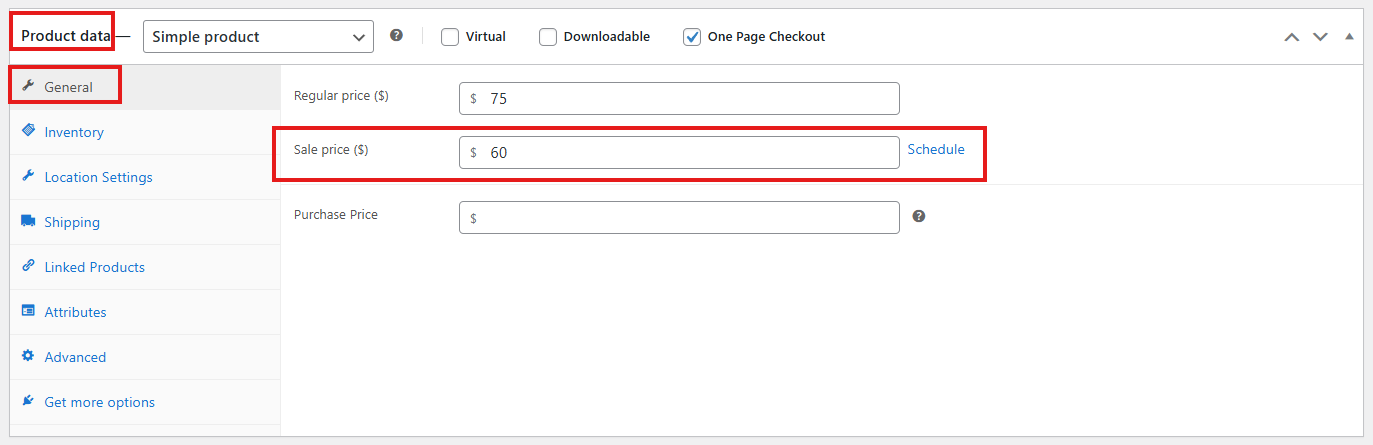
The plugin uses the product’s regular price and sale price to determine the discount percentage. Products without a sale price may not appear when customers filter by discount.
Step 2: Enable the Discount Filter
After preparing discounted products, enable the Discount filter from the filter form settings.
- Go to Product Filters > Form Manage in your WordPress dashboard.
- Find the Discount option.
- Turn the Discount option on if you want to show it in the filter widget.
- Turn it off if you want to hide the Discount filter.
- Click Save Changes.
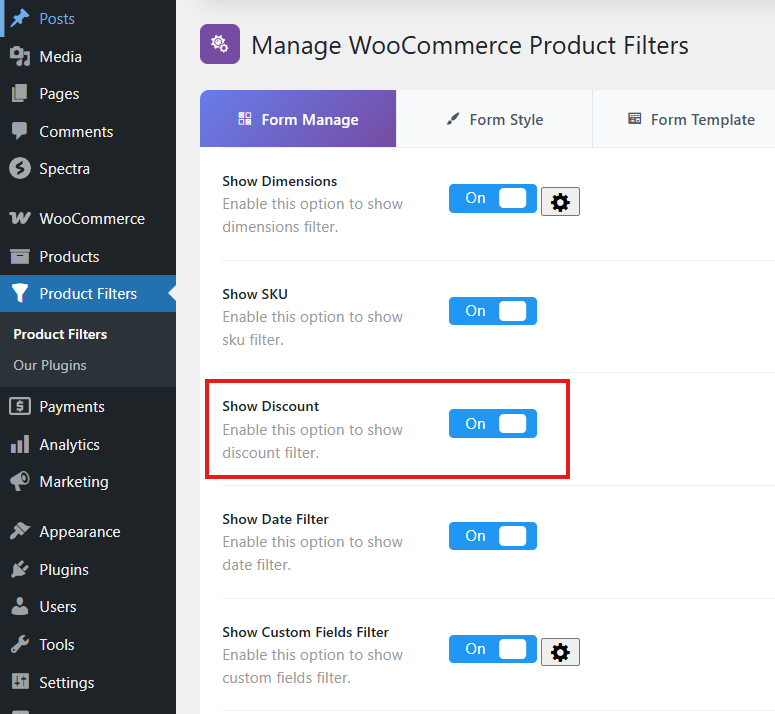
Once enabled, the Discount filter becomes available in your product filter form.
Step 3: Customize the Discount Filter Design
You can customize the Discount filter from the Form Style settings.
- Go to Product Filters > Form Style.
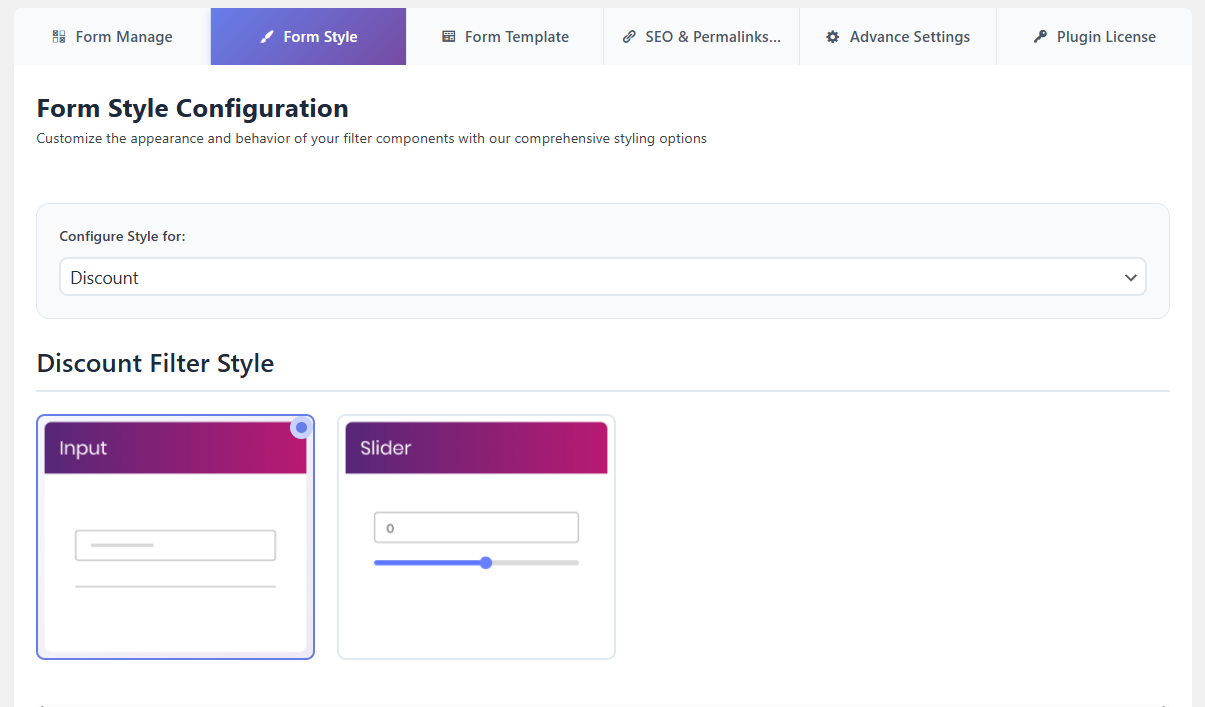
- From the Configure Style for dropdown, choose Discount.
- Choose the Discount layout you want to use.
- Customize the available title, placeholder, and optional settings.
- Click Save or Save Changes.
Available Discount Layouts
The Discount filter supports the following layouts:
- Input: Displays a simple input field where customers can enter a minimum discount percentage.
- Slider: Displays a range slider where customers can select the minimum discount percentage visually.
Use the Input layout if you want a clean and direct field. Use the Slider layout if you want customers to adjust the minimum discount percentage more visually.
Discount Text Settings
You can customize the text shown in the Discount filter.
- Widget Title: Set the frontend title for the Discount filter.
- Placeholder: Set the placeholder text shown inside the input field.
Example widget title:
Minimum Discount
Example placeholder:
Min. % off
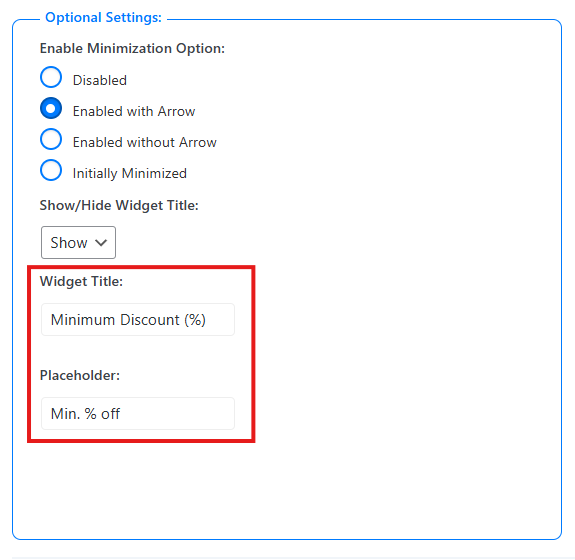
Optional Settings
The optional settings section controls the behavior and display of the Discount widget.
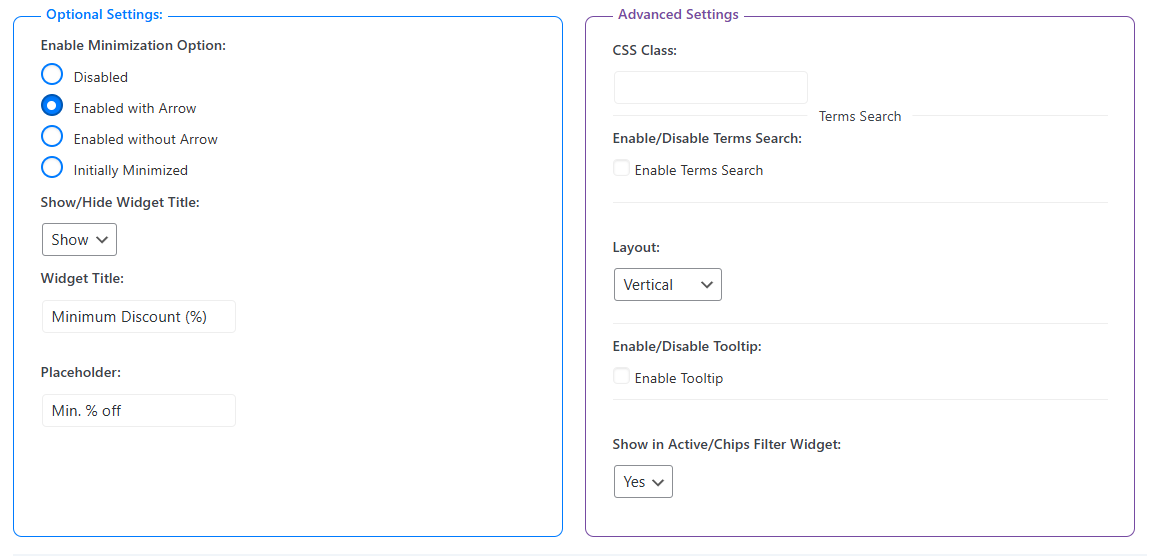
Enable Minimization Option
Controls whether the Discount widget can be collapsed on the frontend.
- Disabled: The Discount filter always stays expanded.
- Enabled with Arrow: Customers can collapse or expand the filter using an arrow icon.
- Enabled without Arrow: Customers can collapse or expand the filter without showing an arrow icon.
- Initially Minimized: The Discount filter loads in a collapsed state.
Show in Active / Chips Filter Widget
Enable this option if you want the selected Discount value to appear in the Active Filters or Chips widget. This helps customers see and remove the active Discount filter easily.
Show / Hide Widget Title
Controls whether the Discount filter title is shown on the frontend.
- Show: Display the Discount widget title.
- Hide: Hide the Discount widget title.
Widget Title
Set a custom title for the Discount filter widget. For example:
Minimum Discount (%)
Placeholder
Set the placeholder text shown inside the Discount input field. For example:
Min. % off
After customizing the Discount widget, click Save to apply your changes.
Step 4: Display the Product Filter with the Block Editor
You can display the product filter on any page using the WordPress block editor.
Use the main filter shortcode:
[plugincy_filters]
Add the filter to a page
- Go to Pages and edit the page where you want to show the filter.
- Click the + icon to add a new block.
- Search for Shortcode.
- Add the Shortcode block.
- Paste
[plugincy_filters]into the block. - Click Update or Publish.
You can also place the shortcode inside a block-based widget area, sidebar, archive template, or Site Editor template if your theme supports it.
If you want to show products on the same page, add WooCommerce product display blocks or product shortcodes according to your store layout.
Expected Result
After completing the setup, customers will be able to filter products by discount percentage from the frontend filter widget.
For example, if a customer enters or selects 30%, the product list will update and show products with a discount of 30% or more.
- The Discount filter helps customers quickly find sale products.
- The result updates through AJAX.
- The filter can be displayed as an input field or a slider.
Example Use Cases
- Sale Campaigns: Customers can quickly find products with a specific minimum discount.
- Deal Pages: Display only products that meet a discount threshold, such as 10%, 20%, or 50% off.
- Large Product Catalogs: Customers can narrow down sale products without browsing every category.
- Seasonal Promotions: Use the Discount filter during clearance, Black Friday, holiday, or flash sale campaigns.
Notes
- Products should have both a regular price and a sale price to be treated as discounted products.
- The Discount filter works as a minimum percentage filter.
- Use the Input layout for a simple field-based design.
- Use the Slider layout for a visual discount selector.
- After changing filter settings, clear your cache if you use a caching plugin.
Troubleshooting
Discount Filter is not showing
Please check the following:
- Discount is enabled in Product Filters > Form Manage.
- The filter shortcode is added to the page, sidebar, widget area, or archive template.
- The product filter settings are saved.
- Cache has been cleared.
No products appear after selecting a discount
This usually means no products match the selected minimum discount percentage. Check that your products have sale prices and that the discount percentage is high enough to match the selected value.
Slider is not showing
Go to Product Filters > Form Style, choose Discount, and make sure the selected Discount layout is Slider. Save the settings and clear cache if needed.