
Dynamic AJAX Product Filters for WooCommerce is designed to work with WooCommerce product queries beyond the default shop and archive pages. This means the plugin can apply selected filters to product grids generated by supported page builders, WooCommerce Blocks, shortcodes, and third-party product layout plugins.
This documentation explains how third-party query compatibility works and when developers may need to adjust or disable compatibility hooks.
Why Third-Party Compatibility Matters
Many WooCommerce stores do not use only the default shop page layout. Products may be displayed through:
- Elementor Pro WooCommerce widgets
- JetEngine listing grids
- WooCommerce Blocks
- WooCommerce product shortcodes
- Product table plugins
- Product grid plugins
- Custom product queries in themes or page builders
When a customer applies a filter, the plugin needs to modify the product query used by these layouts. Third-party compatibility hooks help the plugin apply selected filters to those product queries.
Elementor Pro WooCommerce Widgets
The plugin includes compatibility support for Elementor product queries, including WooCommerce-related Elementor Pro widgets.
This helps filters work with product grids or archive layouts created using Elementor templates.
Supported use cases may include:
- Elementor WooCommerce product archive templates
- Elementor Products widgets
- Elementor product grid layouts
- Custom Elementor product queries
Recommended Elementor Setup
For best results:
- Use Elementor WooCommerce widgets that query the
productpost type. - Keep the product grid on the same page as the filter widget.
- Make sure the product container selector is configured correctly.
- Test filtering with pagination and sorting after saving the Elementor template.
If the product grid does not update after filtering, check the Product Selector in Product Filters → Advanced Settings.
Common selectors include:
ul.products
.plugincy-filter-products
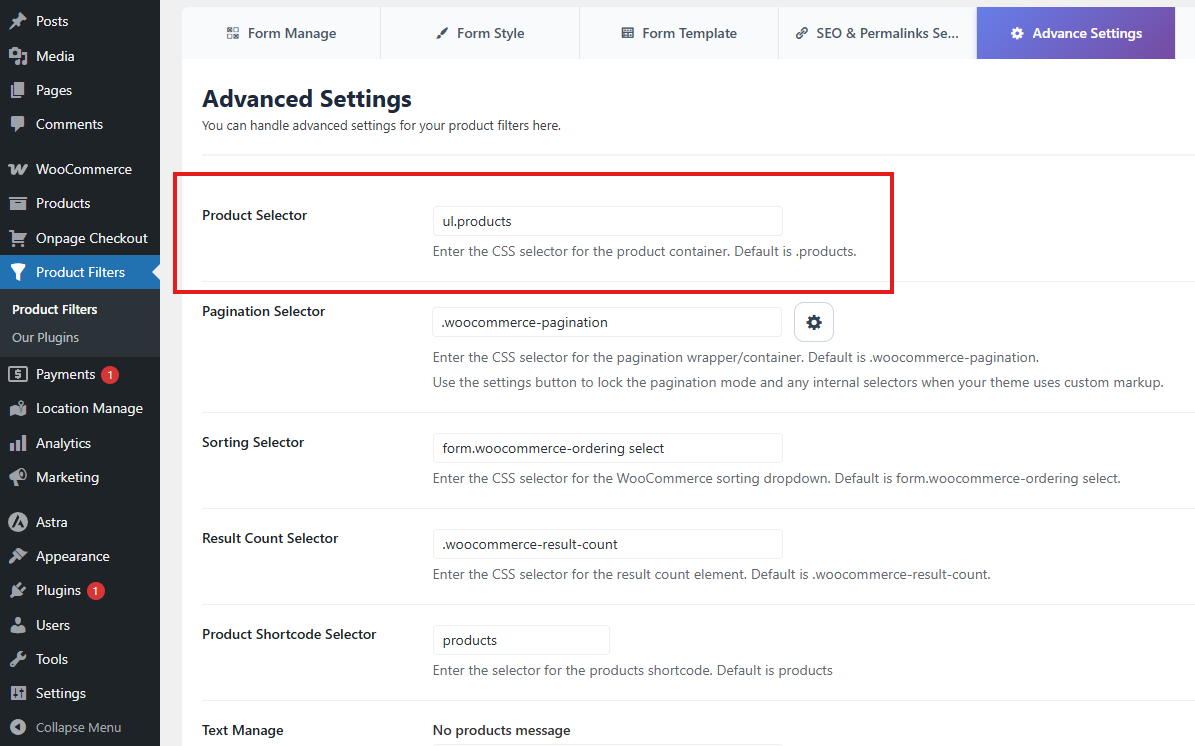
For custom Elementor layouts, inspect the product grid wrapper and use the most stable container selector.
JetEngine Listing Grids
The plugin also includes compatibility support for JetEngine listing grid queries.
This is useful when products are displayed through Crocoblock JetEngine listings instead of the standard WooCommerce product loop.
For JetEngine compatibility, the listing query should be configured to display WooCommerce products.
Recommended setup:
Post Type: Product
If the JetEngine listing displays a different post type, WooCommerce product filters will not apply correctly.
WooCommerce Blocks
The plugin supports WooCommerce product block queries, allowing filters to apply to block-based product layouts.
This includes layouts created with WooCommerce Blocks, block themes, or the WordPress Site Editor.
For block-based layouts, the plugin may add stable helper classes such as:
plugincy-filter-products
and:
plugincy-filter-pagination
These classes help the plugin detect the correct product grid and pagination sections.
Recommended selectors for WooCommerce Blocks:
Product Selector: .plugincy-filter-products
Pagination Selector: .plugincy-filter-pagination
WooCommerce Shortcodes
The plugin can apply filters to WooCommerce product shortcodes.
For example:
[products]
This allows you to display products using WooCommerce shortcodes and still filter them with Dynamic AJAX Product Filters.
The plugin includes a Product Shortcode Selector setting in Advanced Settings. This helps the plugin identify shortcode-based product output.
Default shortcode value:
products
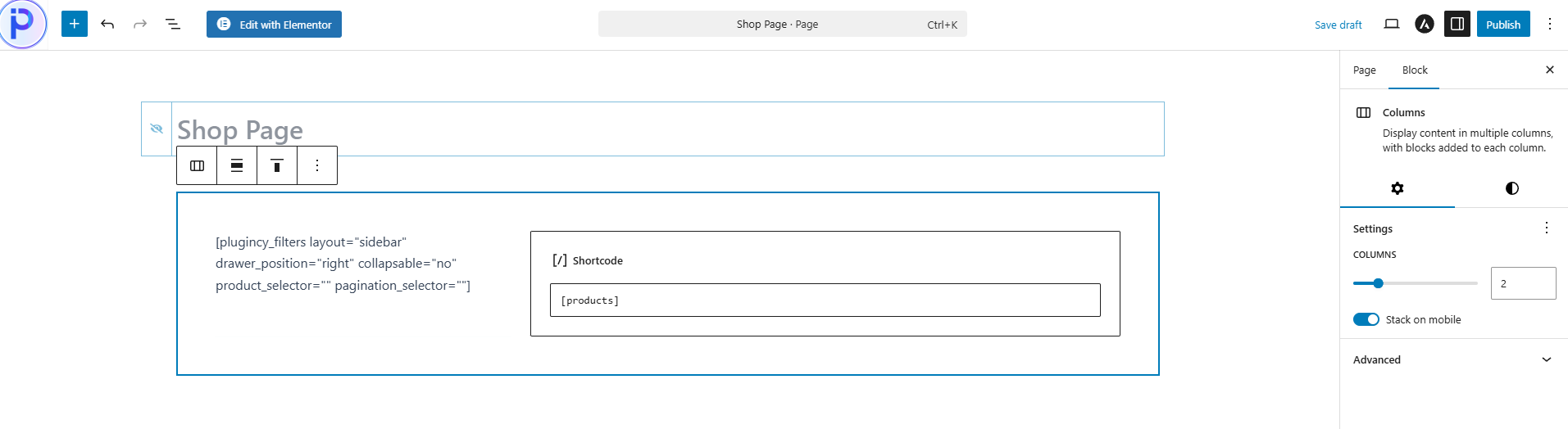
Use this when your shop or landing page displays products through WooCommerce shortcode output.
Product Table and Product Grid Plugins
The plugin includes compatibility hooks for common product table and product grid query arguments.
This helps selected filters apply to third-party product layouts that use filterable WooCommerce product query args.
Supported compatibility may include query hooks used by:
- WooCommerce product grid plugins
- Product table plugins
- Custom product listing plugins
- Product layout builders that expose query args
Because third-party plugins can structure their queries differently, compatibility depends on whether the plugin uses standard WooCommerce or WordPress product query arguments.
When Compatibility May Need Manual Adjustment
Third-party layouts may require manual configuration if:
- The product grid uses a custom wrapper.
- The product query is generated after the page loads.
- The layout uses JavaScript-only rendering.
- The plugin does not use standard WooCommerce product queries.
- The product grid is loaded from a separate REST endpoint.
- The layout replaces products without preserving WooCommerce pagination.
- Multiple product grids exist on the same page.
In these cases, check the selectors in Product Filters → Advanced Settings.
Important selectors include:
Product Selector: ul.products
Pagination Selector: .woocommerce-pagination
Sorting Selector: form.woocommerce-ordering select
Result Count Selector: .woocommerce-result-count
For block themes or custom layouts, these may work better:
Product Selector: .plugincy-filter-products
Pagination Selector: .plugincy-filter-pagination
Developer Filters to Disable Third-Party Hooks
Developers can disable third-party compatibility hooks if they conflict with a custom theme, custom query, or another product filtering system.
To disable all third-party query hooks, add this snippet to your theme’s functions.php file or a custom plugin:
add_filter( 'dapfforwcpro_enable_third_party_hooks', '__return_false' );
This prevents the plugin from attaching additional third-party query compatibility filters.
Disable Specific Compatibility Hooks
Developers can also disable specific integrations.
Disable product grid query hook
add_filter( 'dapfforwcpro_enable_woo_product_grid_hook', '__return_false' );
Disable product table query hook
add_filter( 'dapfforwcpro_enable_wc_product_table_hook', '__return_false' );
Disable WooCommerce product filter query hook
add_filter( 'dapfforwcpro_enable_wc_product_filter_hook', '__return_false' );
Disable JetEngine query hook
add_filter( 'dapfforwcpro_enable_jet_engine_hook', '__return_false' );
Disable WooCommerce Blocks query hook
add_filter( 'dapfforwcpro_enable_wc_blocks_hook', '__return_false' );
Disable custom parse query hook
add_filter( 'dapfforwcpro_enable_parse_query_hook', '__return_false' );
Use these filters only when you are debugging compatibility issues or intentionally want another system to control the product query.
Best Practices
Use standard WooCommerce product queries whenever possible.
Keep the filter widget and product grid on the same page.
Use one main product grid per filter form when possible.
For Elementor, JetEngine, and block layouts, confirm the product query is for the product post type.
Use stable selectors for product grid, pagination, sorting, and result count areas.
Avoid running multiple filtering systems on the same product grid.
Disable third-party hooks only if there is a confirmed conflict.
Troubleshooting
Filters work on the default shop page but not in Elementor
Check that the Elementor widget is displaying WooCommerce products.
Then update the Product Selector if Elementor uses a custom wrapper.
Filters do not affect JetEngine listing grids
Make sure the JetEngine listing query is set to the product post type.
If the listing uses a custom query, confirm it supports standard WordPress/WooCommerce query args.
WooCommerce Blocks product grid does not update
Try using:
.plugincy-filter-products
as the Product Selector.
For pagination, use:
.plugincy-filter-pagination
Product table does not update
Check whether the product table plugin uses standard WooCommerce product queries.
Some product table plugins load products through separate AJAX endpoints. In that case, additional compatibility work may be required.
Filters affect the wrong product grid
This may happen when multiple product grids exist on the same page.
Use a more specific Product Selector that targets only the intended product grid.
Another plugin controls the product query
If another plugin conflicts with Dynamic AJAX Product Filters, a developer can disable third-party hooks:
add_filter( 'dapfforwcpro_enable_third_party_hooks', '__return_false' );
Then test again to identify the conflict.
Summary
Dynamic AJAX Product Filters for WooCommerce includes compatibility hooks for Elementor Pro WooCommerce widgets, JetEngine listing grids, WooCommerce Blocks, WooCommerce shortcodes, and third-party product table/grid query arguments.
For most stores, these hooks improve compatibility automatically.
For advanced custom layouts, developers can adjust selectors or disable specific hooks using available filters.