
Dynamic AJAX Product Filters for WooCommerce includes advanced operator and relation settings that control how multiple selected filters are combined in the product query.
These settings are useful for store owners and developers who want more control over how filtered product results are generated.
With filter operators and query relations, you can decide whether products should match any selected option or all selected options.
What Are Filter Operators?
Filter operators control how multiple selected values inside the same filter group are handled.
For example, if a customer selects two categories:
T-Shirts
Hoodies
The plugin needs to know whether to show products from either category or products that belong to both categories.
This is controlled by operators such as:
OR
AND
OR vs AND Filtering
The two most common filtering operators are OR and AND.
| Operator | Meaning | Example |
|---|---|---|
| OR | Show products that match any selected option | Products in T-Shirts OR Hoodies |
| AND | Show products that match all selected options | Products assigned to both T-Shirts AND Hoodies |
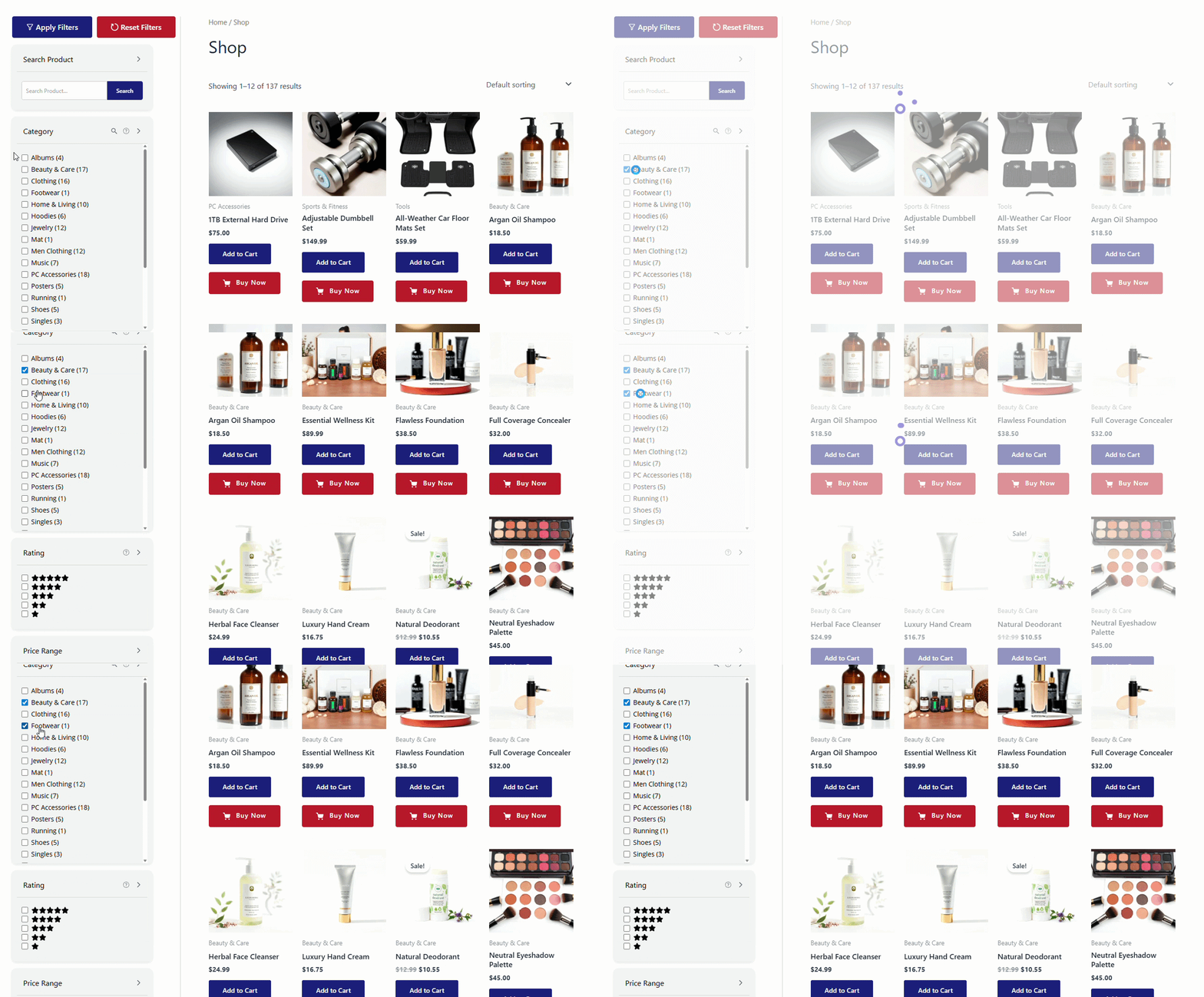
OR Filtering
OR filtering is the most common option.
When OR is used, products only need to match one of the selected values.
Example:
Color: Red OR Blue
This means the product results can include products that are red, blue, or both.
Use OR filtering when customers are choosing alternatives.
Good examples:
Color: Red OR Blue
Size: Small OR Medium
Brand: Nike OR Adidas
Category: Shoes OR Sandals
AND Filtering
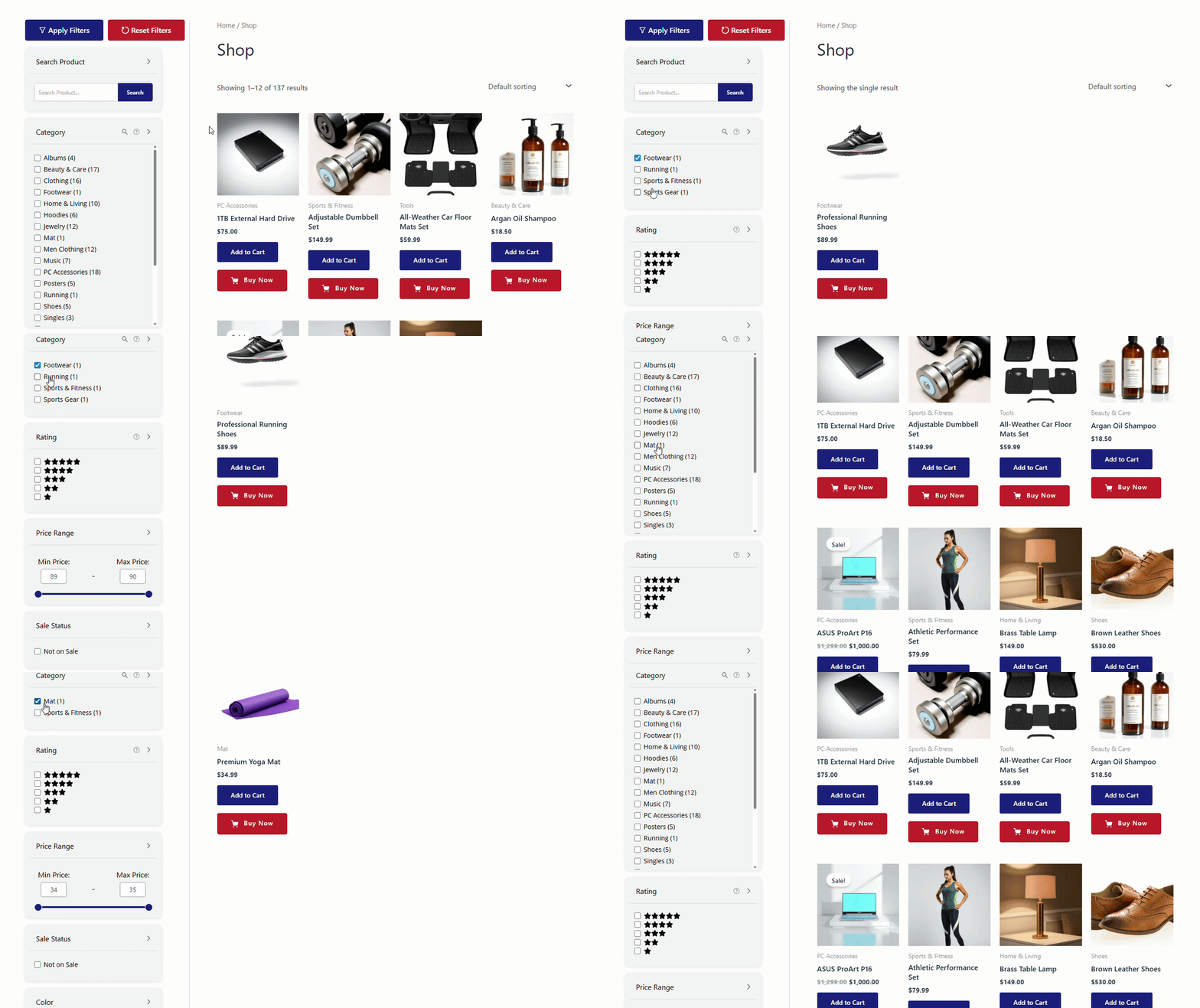
AND filtering is stricter.
When AND is used, products must match all selected values.
Example:
Material: Cotton AND Organic
This means the product must be assigned to both Cotton and Organic to appear in the results.
Use AND filtering when customers are combining requirements, not choosing alternatives.
Good examples:
Feature: Waterproof AND Lightweight
Compatibility: iPhone AND MagSafe
Collection: Summer AND Sale
Material: Cotton AND Organic
Important Note About AND Filtering
AND filtering can return fewer products because every selected option must match.
If customers select too many options with AND filtering, they may see no products.
Use AND filtering carefully and only when it matches the way your product data is structured.
Where to Configure Operators
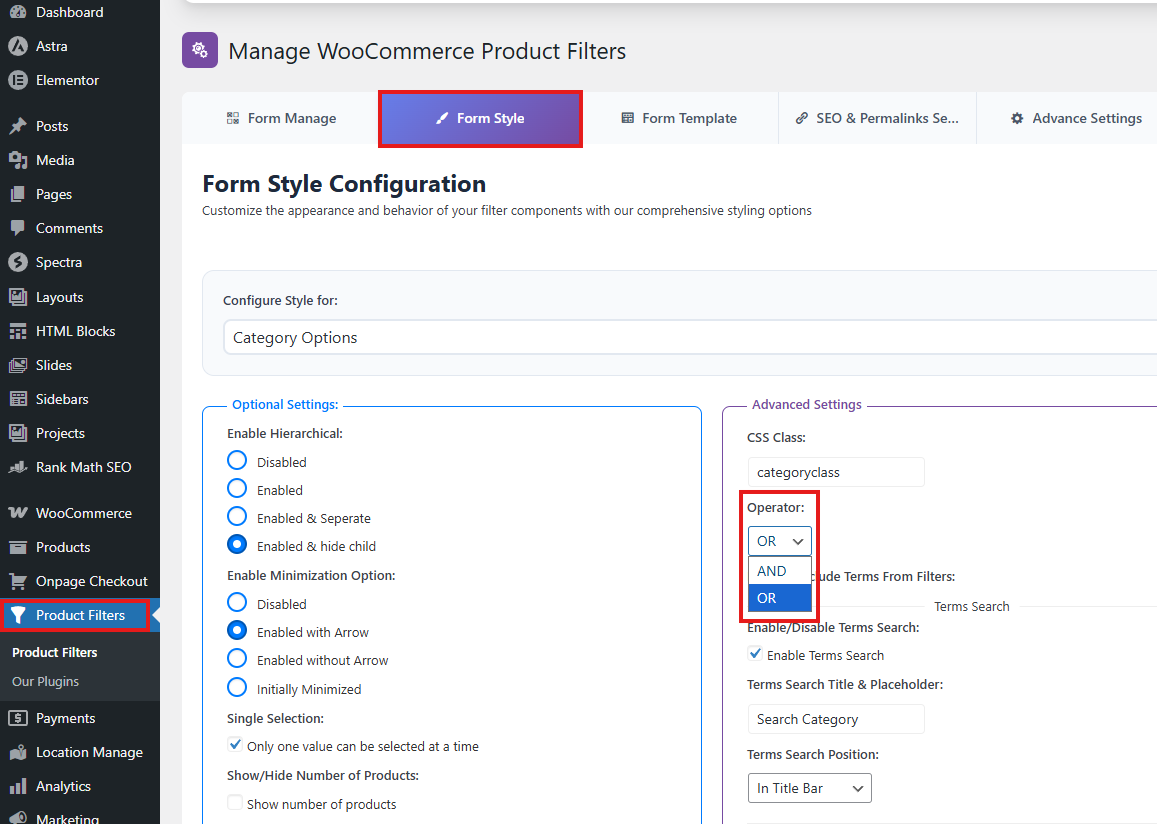
Operators are configured from:
WordPress Dashboard → Product Filters → Form Style
Then:
- Select the filter you want to customize.
- Find the Operator option.
- Choose the preferred operator.
- Click Save Changes.
Operators may be available for filters such as:
Categories
Tags
Attributes
Brands
Custom Taxonomies
Custom Fields
The available operator settings may depend on the selected filter type and style.
Category Operator
The Category Operator controls how multiple selected product categories are handled.
Example selected categories:
Shoes
Sandals
Category OR
With OR behavior, the filter shows products from either selected category.
Example:
Shoes OR Sandals
This is useful when customers want to browse multiple categories at the same time.
Category AND
With AND behavior, the filter shows products that are assigned to all selected categories.
Example:
Shoes AND Sandals
This is useful only when products can belong to multiple selected categories.
Recommended Category Operator
For most WooCommerce stores:
Category Operator: OR
Use AND only if your product category structure supports products being assigned to multiple related categories.
Tag Operator
The Tag Operator controls how multiple selected product tags are handled.
Example selected tags:
New Arrival
Best Seller
Tag OR
With OR behavior, products can match any selected tag.
Example:
New Arrival OR Best Seller
Tag AND
With AND behavior, products must have all selected tags.
Example:
New Arrival AND Best Seller
This is useful when tags represent product features or badges that may overlap.
Recommended Tag Operator
For most stores:
Tag Operator: OR
Use AND when tags represent combined product requirements.
Example:
Waterproof AND Lightweight
Attribute / Terms Operator
The Attribute or Terms Operator controls how selected attribute terms are handled.
Attributes may include:
Color
Size
Material
Style
Fit
Pattern
Attribute OR
Example:
Color: Red OR Blue
This shows products that match any selected color.
Use OR when selected terms are alternatives.
Good examples:
Color: Red OR Blue
Size: Medium OR Large
Material: Cotton OR Linen
Attribute AND
Example:
Feature: Waterproof AND Breathable
This shows products that match all selected attribute terms.
AND can be useful when an attribute represents features or capabilities instead of simple variations.
Important Note for Variation Attributes
For normal variation attributes such as color or size, OR is usually better.
Example:
Color: Red AND Blue
This may return no products unless a product is assigned to both Red and Blue.
For color/size filters, customers usually expect OR behavior.
Recommended Attribute Operator
For most stores:
Attribute Operator: OR
Use AND only for attributes where products can logically match multiple selected terms.
Brand Operator
The Brand Operator controls how multiple selected brands are handled.
Example selected brands:
Nike
Adidas
Brand OR
With OR behavior, products from either selected brand will appear.
Example:
Nike OR Adidas
This is the recommended behavior for most brand filters because a product usually belongs to one brand.
Brand AND
With AND behavior, products must be assigned to all selected brands.
Example:
Nike AND Adidas
This usually returns no products unless products can be assigned to multiple brands.
Recommended Brand Operator
For most stores:
Brand Operator: OR
Use AND only if your store intentionally assigns multiple brands to the same product.
Taxonomy Relation
The Taxonomy Relation controls how different taxonomy-based filters are combined together.
Taxonomy-based filters may include:
Categories
Tags
Attributes
Brands
Custom Taxonomies
This relation is different from the operator inside a single filter.
Example
A customer selects:
Category: Shoes
Brand: Nike
Color: Black
The taxonomy relation controls whether the product must match all selected taxonomy groups or whether matching any group is enough.
Taxonomy Relation: AND
With AND relation, products must match each selected taxonomy group.
Example:
Category: Shoes AND Brand: Nike AND Color: Black
This is the most common behavior for product filtering.
It means the customer is narrowing results step by step.
Taxonomy Relation: OR
With OR relation, products may match any selected taxonomy group.
Example:
Category: Shoes OR Brand: Nike OR Color: Black
This can return broader results and may feel less strict.
Recommended Taxonomy Relation
For most WooCommerce filters:
Taxonomy Relation: AND
This gives customers the expected filtering behavior, where each selected filter narrows the product list.
Meta Relation
The Meta Relation controls how custom-field or metadata-based filters are combined.
Meta-based filters may include:
Custom Fields
Price
SKU
Discount
Date
Dimensions
Other product meta filters
Meta Relation: AND
With AND relation, products must match all selected meta conditions.
Example:
Material: Cotton AND Warranty: 2 Years
This is usually the expected behavior.
Meta Relation: OR
With OR relation, products may match any selected meta condition.
Example:
Material: Cotton OR Warranty: 2 Years
This returns broader results.
Recommended Meta Relation
For most stores:
Meta Relation: AND
Use OR only when customers should see products matching any selected meta condition.
Difference Between Operator and Relation
Operators and relations work at different levels.
| Setting | Controls | Example |
|---|---|---|
| Operator | Multiple values inside one filter | Color: Red OR Blue |
| Taxonomy Relation | Multiple taxonomy filter groups | Category AND Brand AND Color |
| Meta Relation | Multiple custom/meta filter groups | Material AND Warranty |
Example
Customer selects:
Category: Shoes, Sandals
Brand: Nike, Adidas
Custom Field: Warranty 2 Years
Possible logic:
(Category: Shoes OR Sandals)
AND
(Brand: Nike OR Adidas)
AND
(Custom Field: Warranty 2 Years)
This is a common setup because values inside a filter use OR, while different filter groups use AND.
Recommended Default Logic
For most WooCommerce stores, use:
Category Operator: OR
Tag Operator: OR
Attribute/Terms Operator: OR
Brand Operator: OR
Taxonomy Relation: AND
Meta Relation: AND
This creates the most familiar shopping experience.
It means customers can select multiple options inside one filter, while each filter group narrows the result.
Example
Color: Red OR Blue
Brand: Nike OR Adidas
Category: Shoes
Combined logic:
(Category: Shoes)
AND
(Color: Red OR Blue)
AND
(Brand: Nike OR Adidas)
This produces useful and predictable results.
When to Use AND Filtering
Use AND filtering only when selected terms are meant to work together.
Good use cases:
Feature filters
Compatibility filters
Technical specification filters
Multi-tag product classification
Custom taxonomy combinations
Custom field requirements
Examples:
Waterproof AND Lightweight
Organic AND Cotton
iPhone 15 AND MagSafe
Vegan AND Cruelty-Free
Rechargeable AND Wireless
AND filtering is useful when customers are selecting required features.
When Not to Use AND Filtering
Avoid AND filtering for filters where selected options are alternatives.
Examples:
Color: Red AND Blue
Size: Small AND Medium
Brand: Nike AND Adidas
Category: Shoes AND Shirts
These combinations may return few or no products because products may not belong to all selected values.
For these filters, OR is usually better.
Large Store Recommendations
For large stores, operators and relations are important because they directly affect result quality.
Recommended setup:
Use OR inside option groups
Use AND between filter groups
Use AND only for feature-based filters
Avoid strict AND on brand, color, and size
This prevents customers from accidentally creating empty result pages.
Example Large Catalog Setup
For an electronics store:
Brand Operator: OR
Category Operator: OR
Attribute Operator: OR for color/storage
Feature Attribute Operator: AND for technical features
Taxonomy Relation: AND
Meta Relation: AND
For a clothing store:
Category Operator: OR
Tag Operator: OR
Color Operator: OR
Size Operator: OR
Brand Operator: OR
Taxonomy Relation: AND
Meta Relation: AND
For an auto parts store:
Compatibility taxonomy: AND
Brand Operator: OR
Category Operator: OR
Vehicle model/year relation: AND
Meta Relation: AND
Troubleshooting
Selecting multiple options returns too many products
Change the relevant operator from OR to AND if products should match all selected values.
Example:
Feature: Waterproof AND Lightweight
Selecting multiple options returns no products
Change the relevant operator from AND to OR.
This is common for filters such as:
Brand
Color
Size
Category
Brand filter returns no products when multiple brands are selected
Use:
Brand Operator: OR
Most products belong to one brand, so AND may return no results.
Color or size filter returns no products
Use:
Attribute Operator: OR
Color and size values are usually alternatives.
Filters are too broad
Use AND between filter groups through taxonomy/meta relation settings.
For most stores:
Taxonomy Relation: AND
Meta Relation: AND
Filters are too strict
Check whether too many operators are set to AND.
Use OR inside filters where selected options are alternatives.
Best Practices
Use OR for multiple selected values inside category, tag, brand, color, and size filters.
Use AND between different filter groups so each new filter narrows the results.
Use AND for technical features, compatibility, and requirement-based filters.
Avoid AND for brand filters unless products can have multiple brands.
Avoid AND for color and size filters unless products can belong to multiple selected terms.
Test common customer filter combinations after changing operators.
Keep the filtering logic natural and predictable.
Summary
Filter operators and query relations control how selected filters are combined.
Use operators to control multiple selections inside one filter:
Category Operator
Tag Operator
Attribute/Terms Operator
Brand Operator
Use relations to control how different filter groups work together:
Taxonomy Relation
Meta Relation
Recommended setup for most stores:
Category Operator: OR
Tag Operator: OR
Attribute/Terms Operator: OR
Brand Operator: OR
Taxonomy Relation: AND
Meta Relation: AND
This gives customers a flexible but accurate filtering experience: multiple choices inside the same filter are treated as alternatives, while different filter groups narrow the product results.