
Dynamic AJAX Product Filters for WooCommerce includes developer hooks that allow advanced users to control third-party compatibility behavior, query integrations, and query caching.
These hooks are useful when working with custom themes, page builders, product grid plugins, product table plugins, WooCommerce Blocks, JetEngine listings, or custom product queries.
This documentation is intended for developers and advanced users.
When Should Developers Use These Hooks?
Use these hooks only when you need to troubleshoot or customize how the plugin integrates with third-party product layouts.
Common use cases include:
- A custom theme already modifies WooCommerce product queries.
- Another plugin controls the product grid query.
- A product table plugin uses its own query system.
- Elementor, JetEngine, or WooCommerce Blocks need custom handling.
- Filters affect the wrong product grid.
- AJAX filtering conflicts with a custom product loop.
- You need to disable one compatibility layer for debugging.
- You want to control query caching behavior.
For most stores, these hooks are not required. The plugin’s default compatibility behavior should remain enabled.
Where to Add Developer Hooks
You can add these snippets to your child theme’s functions.php file or a custom plugin.
Recommended location:
wp-content/themes/your-child-theme/functions.php
Better option for production sites:
A small custom plugin
Avoid adding custom code directly to a parent theme, because theme updates may remove your changes.
Disable All Third-Party Compatibility Hooks
Use this filter to disable all third-party compatibility hooks added by the plugin.
add_filter( 'dapfforwcpro_enable_third_party_hooks', '__return_false' );
What This Does
This disables the plugin’s additional third-party product query compatibility layer.
Use this when you want Dynamic AJAX Product Filters to work only with the standard WooCommerce filtering behavior and avoid extra third-party query integrations.
When to Use It
Use this if:
- A third-party product grid is being filtered incorrectly.
- Another plugin already handles product queries.
- You are debugging a compatibility conflict.
- You want to isolate the default WooCommerce query behavior.
- Multiple product grids are being affected unexpectedly.
Important Note
Disabling all third-party hooks may also disable compatibility with Elementor, JetEngine, WooCommerce Blocks, product table plugins, or product grid plugins.
Use this only when you understand the impact.
Disable WooCommerce Product Grid Hook
Use this filter to disable the WooCommerce product grid compatibility hook.
add_filter( 'dapfforwcpro_enable_woo_product_grid_hook', '__return_false' );
What This Does
This disables compatibility behavior related to WooCommerce product grid query arguments.
When to Use It
Use this if:
- A third-party product grid plugin is already modifying query arguments.
- Product grids show unexpected products after filtering.
- Filters are applied to a grid that should not be filtered.
- You are debugging product-grid-specific compatibility issues.
Disable WooCommerce Product Table Hook
Use this filter to disable product table compatibility.
add_filter( 'dapfforwcpro_enable_wc_product_table_hook', '__return_false' );
What This Does
This disables compatibility behavior for product table style layouts that use WooCommerce product query arguments.
When to Use It
Use this if:
- A product table plugin loads products through its own AJAX system.
- The product table already has its own filters.
- Dynamic AJAX Product Filters affects table results incorrectly.
- Product table pagination or sorting conflicts with AJAX filtering.
Disable WooCommerce Product Filter Hook
Use this filter to disable WooCommerce product filter compatibility hook behavior.
add_filter( 'dapfforwcpro_enable_wc_product_filter_hook', '__return_false' );
What This Does
This disables a WooCommerce product-filter-related compatibility hook.
When to Use It
Use this if:
- Another WooCommerce filtering plugin is active.
- A product query is being modified twice.
- Filter results are duplicated or incorrect.
- You are testing conflicts with other WooCommerce filter systems.
Disable JetEngine Query Hook
Use this filter to disable JetEngine listing grid compatibility.
add_filter( 'dapfforwcpro_enable_jet_engine_hook', '__return_false' );
What This Does
This disables compatibility handling for JetEngine/Crocoblock listing grid queries.
When to Use It
Use this if:
- JetEngine listings already use a custom query.
- JetEngine filters are being used separately.
- Dynamic AJAX Product Filters affects a JetEngine listing that should not be filtered.
- JetEngine listing results are incorrect after applying filters.
Recommended Check
Before disabling this hook, confirm that your JetEngine listing is intended to display WooCommerce products.
For product filtering, the listing should normally query:
Post Type: Product
Disable WooCommerce Blocks Hook
Use this filter to disable WooCommerce Blocks compatibility.
add_filter( 'dapfforwcpro_enable_wc_blocks_hook', '__return_false' );
What This Does
This disables compatibility behavior for WooCommerce Blocks and block-based product queries.
When to Use It
Use this if:
- A block theme has a custom product query.
- WooCommerce Blocks are handled by another plugin.
- Product block results update incorrectly.
- Block pagination conflicts with AJAX filtering.
- You are debugging block theme compatibility.
Related Selectors
If WooCommerce Blocks are not updating correctly, you may not need to disable the hook. First try using the plugin’s injected selectors:
.plugincy-filter-products
.plugincy-filter-pagination
Disable Parse Query Hook
Use this filter to disable custom parse query compatibility.
add_filter( 'dapfforwcpro_enable_parse_query_hook', '__return_false' );
What This Does
This disables compatibility behavior that modifies product queries through the WordPress query parsing process.
When to Use It
Use this if:
- Your theme uses custom
parse_querylogic. - A custom plugin modifies product queries at the same stage.
- Filter parameters are being applied to unexpected queries.
- Non-product queries are being affected.
- You are debugging advanced query conflicts.
Use this carefully, because disabling parse query compatibility may prevent filters from applying in some custom layouts.
Disable Query Cache Bypass
Use this filter to control query cache behavior.
add_filter( 'dapfforwcpro_disable_query_cache', '__return_false' );
What This Does
By default, the plugin may bypass or disable query caching in certain filtering scenarios to ensure fresh and accurate AJAX results.
Adding this filter returns false, which tells the plugin not to disable query cache through this hook.
When to Use It
Use this if:
- You are optimizing performance on a large store.
- You have a custom caching strategy.
- Your hosting environment handles object/query caching correctly.
- You want to test whether query caching improves filtered page performance.
- You are debugging slow AJAX filtering requests.
Important Note
Be careful when allowing query cache during filtered results. Cached queries may return stale or incorrect product results if the cache system does not vary by filter parameters.
Always test filtering carefully after changing query cache behavior.
Recommended Debugging Workflow
If filtering conflicts with a third-party layout, do not disable every hook immediately.
Use this workflow:
Step 1: Confirm the issue
Test filtering on the default WooCommerce shop page.
If the default shop page works, the issue is likely related to a custom grid, block, builder, or third-party query.
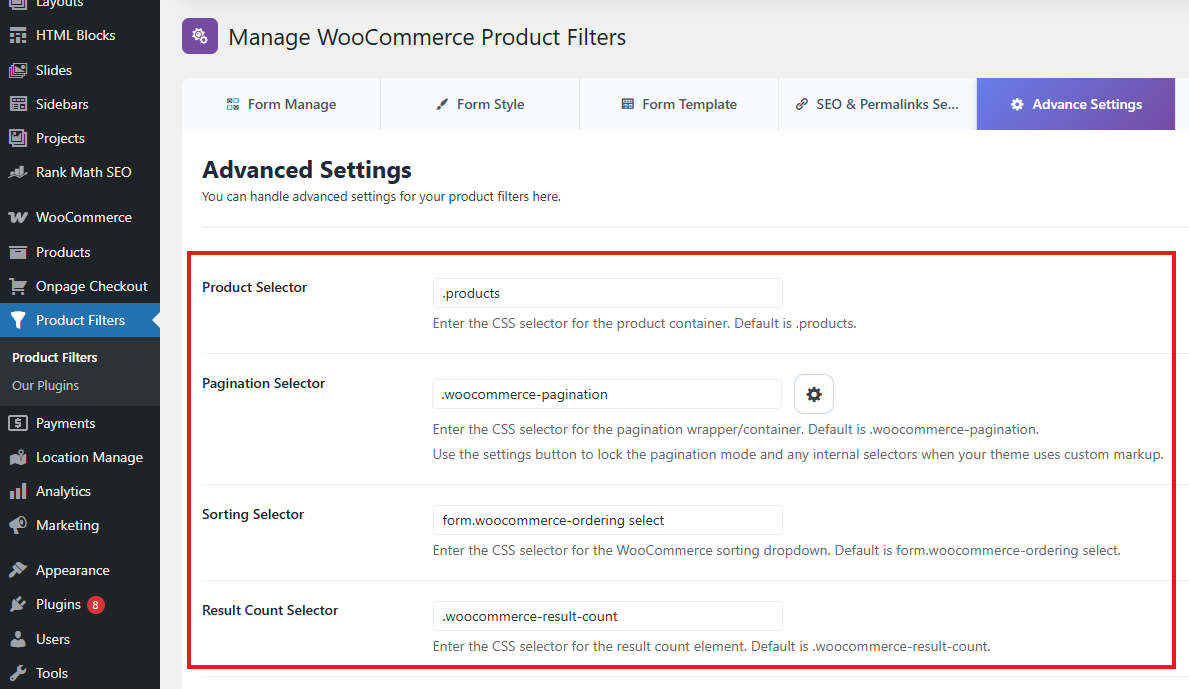
Step 2: Check selectors
Before disabling hooks, check the selectors in:
Product Filters → Advanced Settings
Important selectors include:
Product Selector: ul.products
Pagination Selector: .woocommerce-pagination
Sorting Selector: form.woocommerce-ordering select
Result Count Selector: .woocommerce-result-count
For block themes, try:
Product Selector: .plugincy-filter-products
Pagination Selector: .plugincy-filter-pagination
Step 3: Disable one hook at a time
Disable only the hook related to the affected layout.
For example, if the issue is with JetEngine, test:
add_filter( 'dapfforwcpro_enable_jet_engine_hook', '__return_false' );
If the issue is with WooCommerce Blocks, test:
add_filter( 'dapfforwcpro_enable_wc_blocks_hook', '__return_false' );
Step 4: Test again
After adding a hook:
- Clear cache.
- Reload the shop or archive page.
- Apply filters.
- Test sorting and pagination.
- Check product counts and active filter chips.
Step 5: Keep only the needed snippet
Remove any snippets that are not required.
Avoid disabling all compatibility hooks unless necessary.
Common Examples
Example 1: Disable all third-party compatibility hooks
Use this when you want to test default WooCommerce filtering only.
add_filter( 'dapfforwcpro_enable_third_party_hooks', '__return_false' );
Example 2: Disable only JetEngine compatibility
Use this when a JetEngine listing grid is being affected incorrectly.
add_filter( 'dapfforwcpro_enable_jet_engine_hook', '__return_false' );
Example 3: Disable only WooCommerce Blocks compatibility
Use this when a block theme or WooCommerce Product Collection block conflicts with filtering.
add_filter( 'dapfforwcpro_enable_wc_blocks_hook', '__return_false' );
Example 4: Keep query cache enabled
Use this when testing performance optimization.
add_filter( 'dapfforwcpro_disable_query_cache', '__return_false' );
Hook Reference
| Hook | Purpose |
|---|---|
dapfforwcpro_enable_third_party_hooks | Enables/disables all third-party compatibility hooks |
dapfforwcpro_enable_woo_product_grid_hook | Enables/disables WooCommerce product grid query compatibility |
dapfforwcpro_enable_wc_product_table_hook | Enables/disables product table query compatibility |
dapfforwcpro_enable_wc_product_filter_hook | Enables/disables WooCommerce product filter query compatibility |
dapfforwcpro_enable_jet_engine_hook | Enables/disables JetEngine listing grid compatibility |
dapfforwcpro_enable_wc_blocks_hook | Enables/disables WooCommerce Blocks query compatibility |
dapfforwcpro_enable_parse_query_hook | Enables/disables parse query compatibility |
dapfforwcpro_disable_query_cache | Controls whether the plugin disables query cache during filtering |
Complete Example
You can combine hooks when needed.
Example:
<?php
/**
 * Customize Dynamic AJAX Product Filters compatibility behavior.
 */

// Disable JetEngine compatibility only.
add_filter( 'dapfforwcpro_enable_jet_engine_hook', '__return_false' );

// Disable WooCommerce Blocks compatibility only.
add_filter( 'dapfforwcpro_enable_wc_blocks_hook', '__return_false' );

// Keep query cache enabled for testing.
add_filter( 'dapfforwcpro_disable_query_cache', '__return_false' );
Only add the hooks you actually need.
Best Practices
Use these hooks only for debugging or advanced compatibility control.
Disable one hook at a time.
Do not disable all third-party hooks unless you are sure the issue comes from third-party compatibility.
Clear cache after adding or removing snippets.
Test filtering with:
Product results
Pagination
Sorting
Result count
Active filter chips
Reset button
WooCommerce archive pages
Category/tag/brand pages
Use a child theme or custom plugin for code snippets.
Keep a record of any custom snippets added to the site.
Summary
Dynamic AJAX Product Filters for WooCommerce provides developer hooks to control third-party query compatibility and query caching.
Use these filters when debugging or customizing compatibility with:
Elementor Pro WooCommerce widgets
JetEngine listing grids
WooCommerce Blocks
WooCommerce shortcodes
Product table plugins
Product grid plugins
Custom WooCommerce product queries
For most stores, leave all compatibility hooks enabled.
For advanced troubleshooting, disable only the specific hook related to the conflict, test carefully, and keep only the snippet that is required.