
Cart Recovery helps you track abandoned WooCommerce carts and recover lost sales by sending follow-up emails to customers who leave your store before completing their purchase.
When a customer adds products to the cart and provides identifiable information, such as an email address, phone number, checkout details, or logged-in account information, the plugin can save the cart session. If the customer does not complete the order and the cart remains inactive for the configured time, the cart can be marked as abandoned.
Once a cart becomes abandoned, the plugin can send recovery emails based on your email templates and schedule. Customers can click the recovery link in the email to return to the store and restore their cart.
Where to find Cart Recovery
From your WordPress dashboard, go to:
Onpage Checkout → Cart Recovery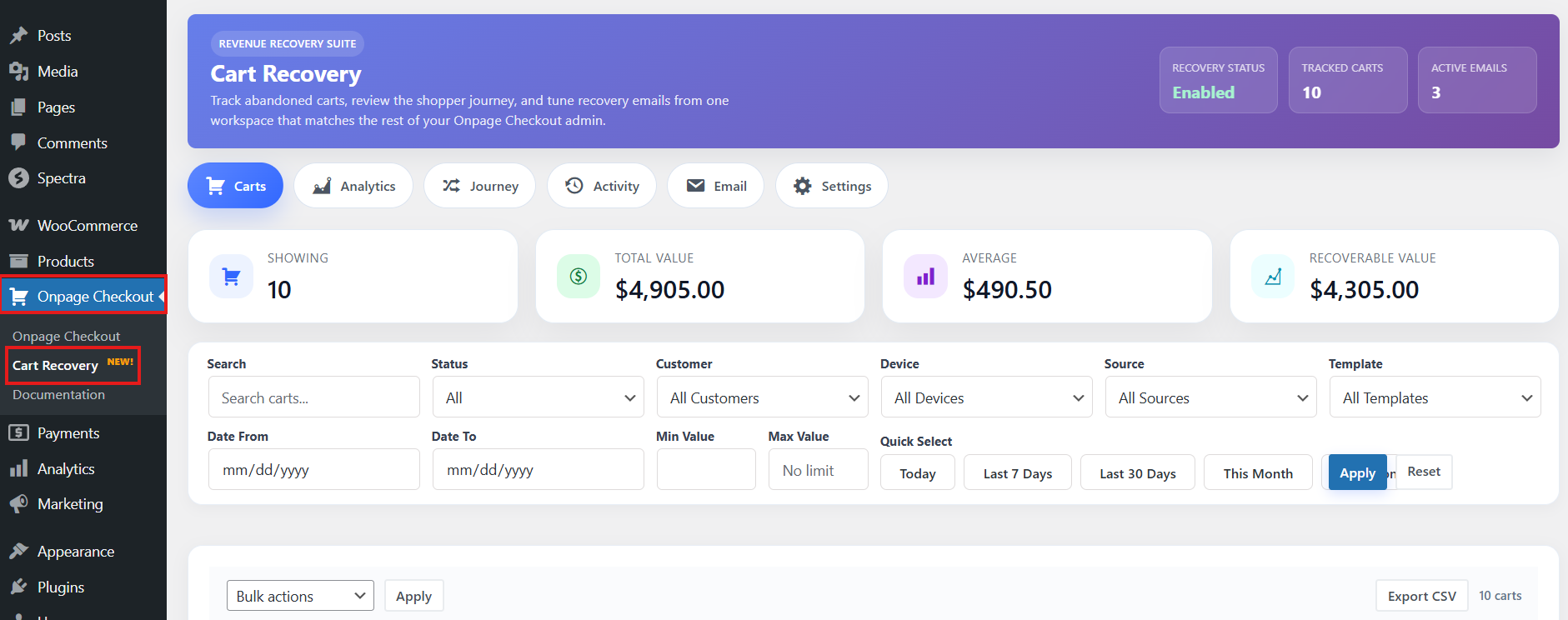
This opens the Cart Recovery workspace, where you can view tracked carts, review customer activity, manage recovery emails, and configure recovery settings.
How Cart Recovery works
Cart Recovery follows this basic flow:
Customer adds product to cart
↓
Plugin tracks the cart
↓
Customer leaves without completing checkout
↓
Cart becomes abandoned after the inactivity timeout
↓
Recovery email is sent
↓
Customer clicks restore link
↓
Customer completes checkout
↓
Cart is marked as recovered
Cart status flow
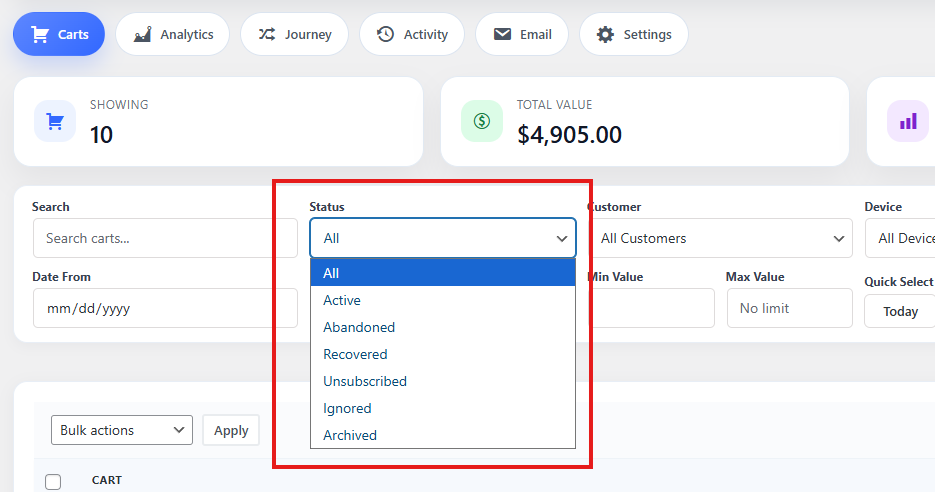
A cart can move through several statuses during the recovery process.
Active
The customer currently has products in the cart, and the cart has not yet passed the inactivity timeout.
Abandoned
The cart has remained inactive longer than the configured inactivity timeout.
Restored
The customer returned to the store and restored the abandoned cart, usually by clicking a recovery email link.
Recovered
The customer completed checkout after the cart was abandoned, restored, or involved in recovery email activity.
Archived or Ignored
These are admin-managed states used to organize carts that you do not want to actively process.
What information can be tracked
Cart Recovery may store information such as:
- Customer name
- Customer email
- Customer ID, if logged in
- Cart total
- Currency
- Products in the cart
- Number of cart items
- Cart status
- Checkout data
- Recovery email activity
- Restore/unsubscribe tokens
- Recovered order ID
- Cart journey events
- IP address and browser/user agent details
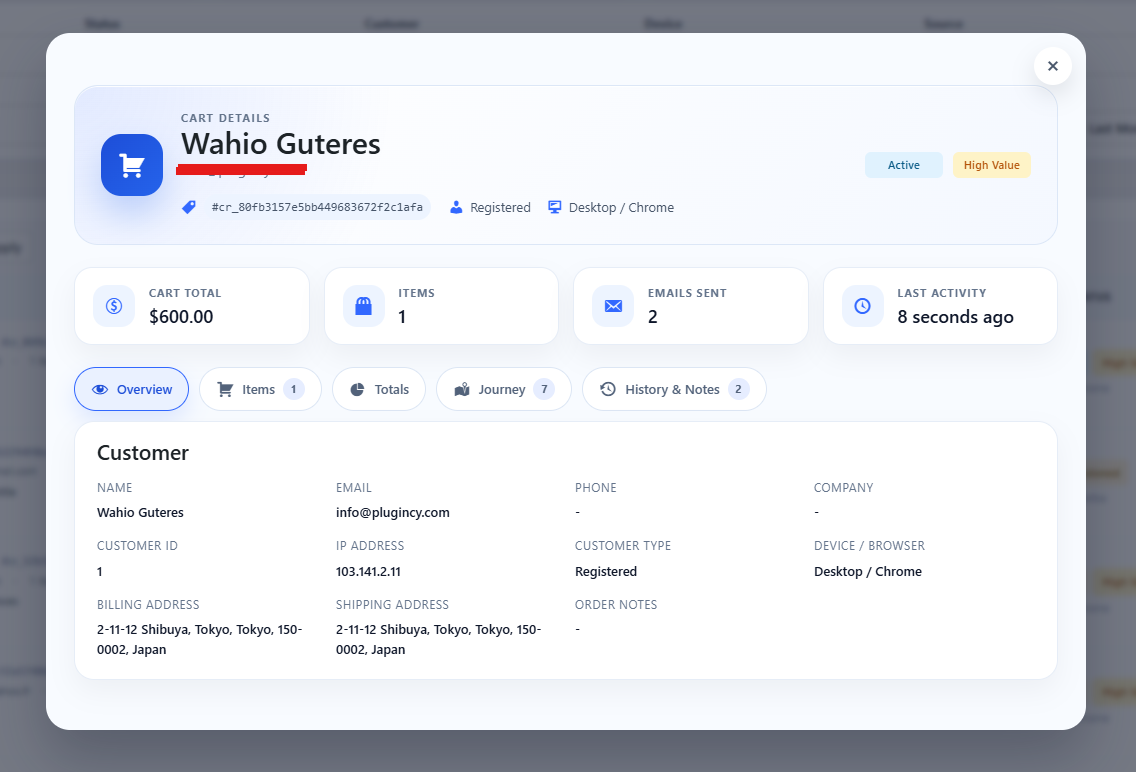
Because this may include personal data, store owners should configure retention settings carefully and mention abandoned cart tracking in their store privacy policy.
What Cart Recovery helps you do
With Cart Recovery, you can:
- See which customers abandoned carts
- Review cart value and products
- Track customer journey events
- Send automated recovery emails
- Restore abandoned carts through email links
- Track opened and clicked recovery emails
- Measure recovered revenue
- Export cart and activity data
- Ignore, archive, delete, or manually update carts
Requirements
Cart Recovery requires:
- WooCommerce installed and active
- Working WooCommerce cart/session functionality
- Cart Recovery enabled in the plugin settings
- Customer identity data, usually an email address or logged-in customer account
- WordPress cron working correctly for automatic email processing
- An active Pro license for premium Cart Recovery automation features
When should you use Cart Recovery?
Cart Recovery is useful for any WooCommerce store where customers add products to the cart but do not always complete checkout.
It is especially helpful for:
- Stores with high cart abandonment
- Stores selling medium or high-value products
- Stores using one-page checkout
- Stores using popup checkout or side cart checkout
- Stores that want automated follow-up emails
- Stores that want to measure recovered revenue