
All sections
These settings decide what happens when a shopper clicks Buy Now. Find them under Onpage Checkout > Direct Checkout > General Settings, in the Quick Checkout Behavior block.
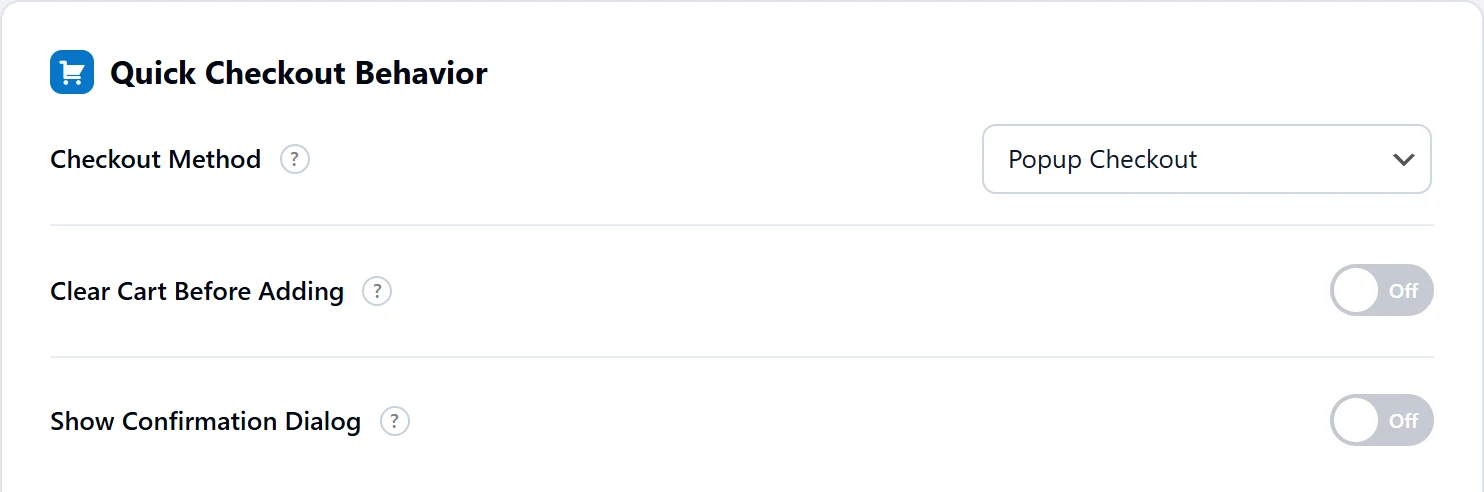
Checkout Method
| Method | What the shopper sees | Good for |
|---|---|---|
| Redirect to Checkout | Goes straight to the checkout page. This is the default. | Buying one item quickly |
| AJAX Add to Cart | Stays on the page, with a message. | Buying several items |
| Redirect to Cart Page | Goes to the cart page. Not available when Disable Cart Page is on. | Checking the order first |
| Popup Checkout PRO | Checkout opens over the page. | Product and landing pages |
| Side Cart Slide-in | The cart drawer slides open. Needs Enable Sticky Cart on. | Shops that want the cart in view |
Clear Cart Before Adding
When this is on, anything already in the cart is removed before the new product goes in, so the shopper checks out with that one product. It is off by default and works with every method.
Use it for one-product shops, event tickets or landing pages. Leave it off if people often buy several things, because they will lose what they added earlier.
Show Confirmation Dialog
When this is on, the browser asks the shopper to confirm. If Clear Cart Before Adding is also on, the box warns that the cart will be cleared. If the shopper clicks Cancel, nothing changes. It is off by default.
The box appears right after the click, before the product is added, not before payment. It is useful mainly with Clear Cart Before Adding, so nobody loses their cart by accident.
Test your choice
Click Save Changes, then open a product in a private browser window and click Buy Now. Try it with something already in the cart too.