
Cart Recovery can store customer, cart, checkout, and recovery email information so abandoned carts can be reviewed and recovered. Because this may include personal data, store owners should configure retention settings carefully and update their privacy policy if required.
This guide explains what data Cart Recovery stores, how retention works, what happens during cleanup/anonymization, and which features may require an active Pro license.
What data is stored
When Cart Recovery tracks a cart, it may store information related to the customer, cart, products, checkout activity, recovery emails, and admin actions.
The exact data available depends on what the customer has entered, whether the customer is logged in, and which Cart Recovery features are enabled.
Customer information
Cart Recovery may store customer details such as:
- Customer name
- Customer email address
- Customer ID, if the customer is logged in
- Phone number, if entered during checkout
- Billing details, if entered during checkout
- Shipping details, if entered during checkout
- Customer type, such as guest or registered customer
Cart information
Cart Recovery may store cart details such as:
- Cart total
- Currency
- Number of cart items
- Product names
- Product IDs
- Product quantities
- Product variations
- Product context or summary
- Cart snapshot
- Cart hash
- Cart status
Checkout information
If the customer begins checkout, Cart Recovery may store checkout-related information such as:
- Billing fields
- Shipping fields
- Order notes
- Email and phone fields
- Checkout form data needed for recovery context
Technical information
Cart Recovery may store technical data such as:
- Session ID
- Recovery token
- IP address
- Browser/user agent
- Created date
- Updated date
- Abandoned date
- Restored date
- Recovered date
- Recovered order ID
Recovery email information
When recovery emails are used, Cart Recovery may store email activity such as:
- Email template ID
- Template name
- Recipient email address
- Email subject
- Email status
- Sent date
- Opened date
- Clicked date
- Open tracking token
- Click tracking token
- Discount code, if used
- Delivery error, if sending fails
Activity and journey events
Cart Recovery may store journey/activity events such as:
- Cart created
- Cart updated
- Cart abandoned
- Cart restored
- Cart recovered
- Email sent
- Email opened
- Email clicked
- Email failed
- Admin status changes
- Manual recovery actions
Why this data is stored
Cart Recovery stores this data to help store owners:
- Identify abandoned carts
- Understand what products were left behind
- Send recovery reminders
- Restore a customer’s cart through a recovery link
- Track whether recovery emails were opened or clicked
- Measure recovered revenue
- Review customer journey history
- Troubleshoot failed recovery emails
- Export recovery reports
Only collect and retain the data you need for your store’s abandoned cart recovery workflow.
Retention days
The Retention Days setting controls how long Cart Recovery keeps old cart recovery records.
You can use this setting to avoid storing abandoned cart data longer than necessary.
Example:
Retention Days: 30
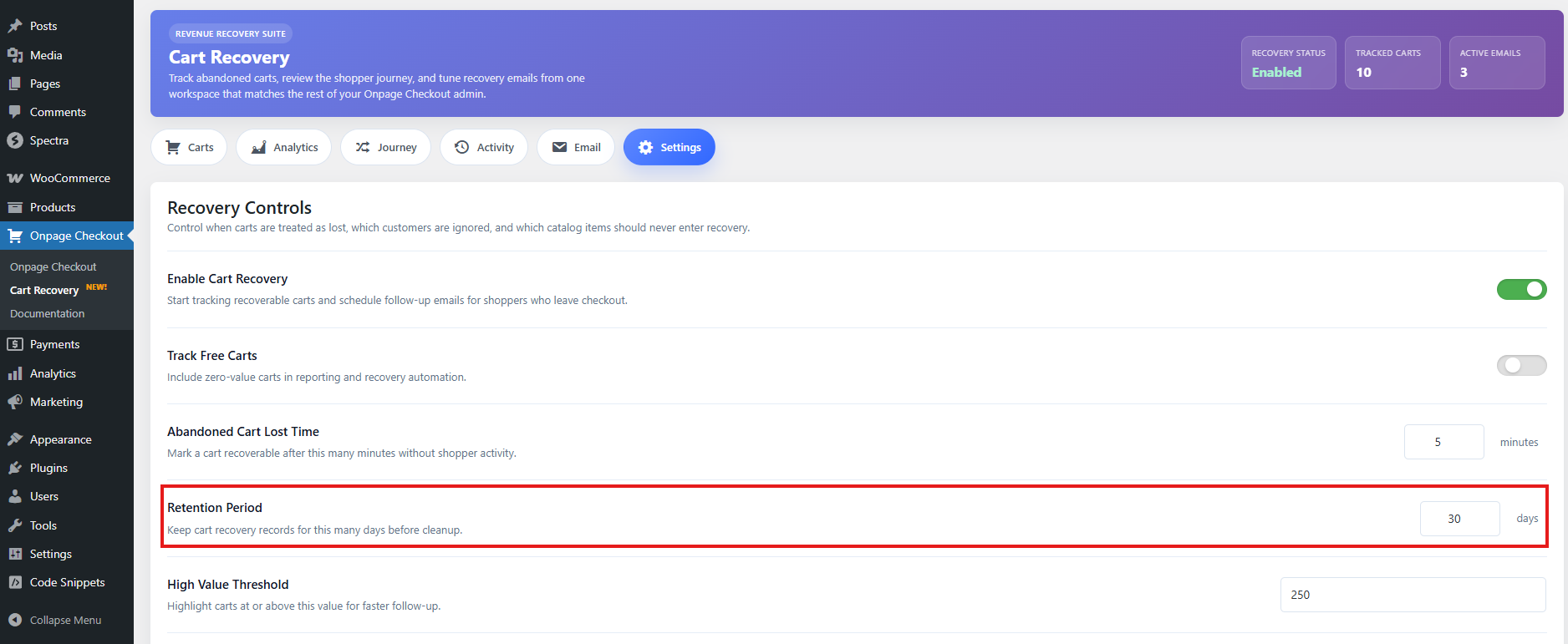
This means Cart Recovery should clean up or anonymize cart recovery records after the configured retention period.
Recommended retention settings
| Store preference | Suggested retention |
|---|---|
| Privacy-focused setup | 14–30 days |
| Standard WooCommerce store | 30–60 days |
| Longer reporting period | 90 days |
For most stores, a good starting point is:
30 days
This gives enough time to run a recovery sequence while avoiding unnecessary long-term storage of abandoned cart data.
Cleanup and anonymization
Cart Recovery may clean up or anonymize expired cart records based on the retention period.
Cleanup
Cleanup may remove old recovery records that are no longer needed.
This helps:
- Reduce database size
- Remove outdated cart data
- Keep the Cart Recovery dashboard cleaner
- Improve privacy and data minimization
Anonymization
Anonymization removes or clears personal customer information while keeping limited non-personal data for reporting.
During anonymization, customer-identifying information may be removed or replaced.
This may include:
- Replacing customer name with an anonymized label
- Clearing email address
- Clearing IP address
- Clearing browser/user agent
- Clearing checkout data
- Removing customer profile metadata
After anonymization, the record may still be useful for general reporting, but it should no longer identify the customer directly.
When cleanup runs
Cart Recovery uses scheduled background processing to review cart recovery records and process email queues. For cleanup and email automation to work reliably, WordPress cron must be working correctly.
If scheduled tasks are not running, abandoned carts may not be updated, old records may not be cleaned up, and recovery emails may not send on time.
Recommended cron check
If you notice that old carts are not being cleaned up, check:
- WordPress cron is enabled.
- Your hosting server is not blocking scheduled tasks.
- A real server cron is configured for high-traffic or performance-focused stores.
- Caching/security plugins are not blocking scheduled requests.
Privacy policy recommendation
Because Cart Recovery may store customer and cart information, you should mention abandoned cart tracking in your store’s privacy policy.
Your privacy policy should explain:
- What data is collected
- Why it is collected
- How it is used
- How long it is stored
- How customers can unsubscribe from recovery emails
- How customers can request deletion or access, if applicable
Suggested privacy policy wording
You can adapt this example:
When you add products to your cart or begin checkout, we may store your name, email address, cart contents, checkout details, and related technical information. We use this information to remind you about incomplete purchases, restore your cart, and improve our checkout experience.

If you receive a cart recovery email, you can unsubscribe from future cart recovery reminders using the unsubscribe link in the email.
Important legal note
Privacy requirements vary by country and region. If your store must comply with GDPR, CCPA, or other privacy laws, review your Cart Recovery setup and privacy policy with a qualified legal professional.
Customer consent and transparency
Depending on your location and customer base, you may need to inform customers that abandoned cart tracking is used.
Good places to communicate this include:
- Privacy policy
- Checkout page privacy notice
- Cookie/banner notice, if required
- Terms and conditions
- Email footer
Avoid hiding the fact that recovery emails are sent. Clear communication helps build trust and reduces spam complaints.
Unsubscribe handling
Every recovery email should include an unsubscribe link.
When a customer unsubscribes:
- Further recovery emails for that cart should stop.
- The existing cart record may remain for reporting or retention purposes.
- The customer may still receive normal WooCommerce transactional emails.
- The customer may still receive newsletter or marketing emails from other tools unless those tools are connected to the same unsubscribe system.
Unsubscribing from Cart Recovery emails is not necessarily the same as unsubscribing from all store emails.
Pro and license-required features
Some Cart Recovery features may require an active Pro license.
License-required features may include:
- Automated recovery email sending
- Recovery email templates
- Multiple email sequences
- Email activity actions
- Resend or retry failed recovery emails
- Advanced cart/customer details
- Customer journey details
- Analytics
- Manual recovery actions
- Export features
- Notes and tags
- Bulk actions
The exact access may depend on your plugin version and license status.
Email automation license requirement
Recovery email automation is a Pro-level feature.
An active license may be required for:
- Sending recovery emails automatically
- Processing enabled recovery email templates
- Sending the next email in a sequence
- Resending previous emails
- Retrying failed emails
- Sending test recovery emails
- Viewing or managing advanced email automation data
If the license is not active, Cart Recovery may still display limited information, but email automation may be locked or unavailable.
What works without an active license
When the license is inactive or required Pro access is unavailable, Cart Recovery may still provide limited access depending on your plugin version.
Possible limited features may include:
- Viewing basic tracked cart records
- Seeing limited cart details
- Basic recovery status visibility
- Basic settings access
- Details-only mode
- License-required notices
- Upgrade or activation prompts
However, advanced features such as automated recovery emails, email templates, customer contact details, analytics, journey details, resend actions, and exports may be restricted.
Recommended wording for users
Use this explanation in the documentation:
Some Cart Recovery features require an active Pro license. If your license is inactive, you may still see limited Cart Recovery information, but email automation and advanced recovery tools may be unavailable until the license is activated.
How to check your license
To check or activate your license, go to:
Onpage Checkout → Plugin License
After activating the license, return to:
Onpage Checkout → Cart Recovery
Then confirm that email templates, analytics, exports, and advanced recovery actions are available.
Recommended privacy-friendly setup
For most stores, use this configuration:
| Setting | Recommended value |
|---|---|
| Retention Days | 30 days |
| Max Emails Per Cart | 2–3 |
| Stop Emails After Restore | Enabled |
| Unsubscribe Link | Included in every recovery email |
| Excluded Roles | Administrator, Shop Manager |
| Track Free Carts | Disabled unless needed |
| Privacy Policy | Updated with abandoned cart tracking notice |
Best practices
Store only what you need
Do not track carts that are not useful for recovery. Use exclusions for internal users, test products, and categories that should not trigger recovery.
Keep retention reasonable
Avoid storing abandoned cart data indefinitely. A 30–60 day retention period is usually enough for recovery and reporting.
Use clear email language
Tell customers why they are receiving the email.
Example:
You are receiving this email because you started checkout on our store but did not complete your order.
Always include unsubscribe
Every recovery email should include an unsubscribe link.
Review exports carefully
Exported cart recovery data may contain personal information. Store exported files securely and delete them when they are no longer needed.
Limit access to Cart Recovery data
Only trusted admins or store managers should have access to abandoned cart records and customer recovery details.
Test after license activation
After activating or renewing a license, test recovery email templates and send a test email to confirm that automation works correctly.
Troubleshooting license and privacy issues
Email templates are locked
Check that your Pro license is active.
Go to:
Onpage Checkout → Plugin License
Recovery emails are not sending
Check:
- License status
- Email templates are enabled
- Customer email exists
- WordPress cron is running
- Sending window allows sending
- Max emails per cart has not been reached
- Customer has not unsubscribed
Analytics or journey tabs are locked
Some reporting features may require an active Pro license. Activate your license and reload the Cart Recovery page.
Old carts are still visible
Check:
- Retention days setting
- WordPress cron
- Cleanup process
- Whether carts are archived, ignored, or recovered
- Whether the data is retained for reporting
Customer requested data deletion
If a customer requests deletion, review their cart records and remove or anonymize personal data according to your store policy and legal requirements.