
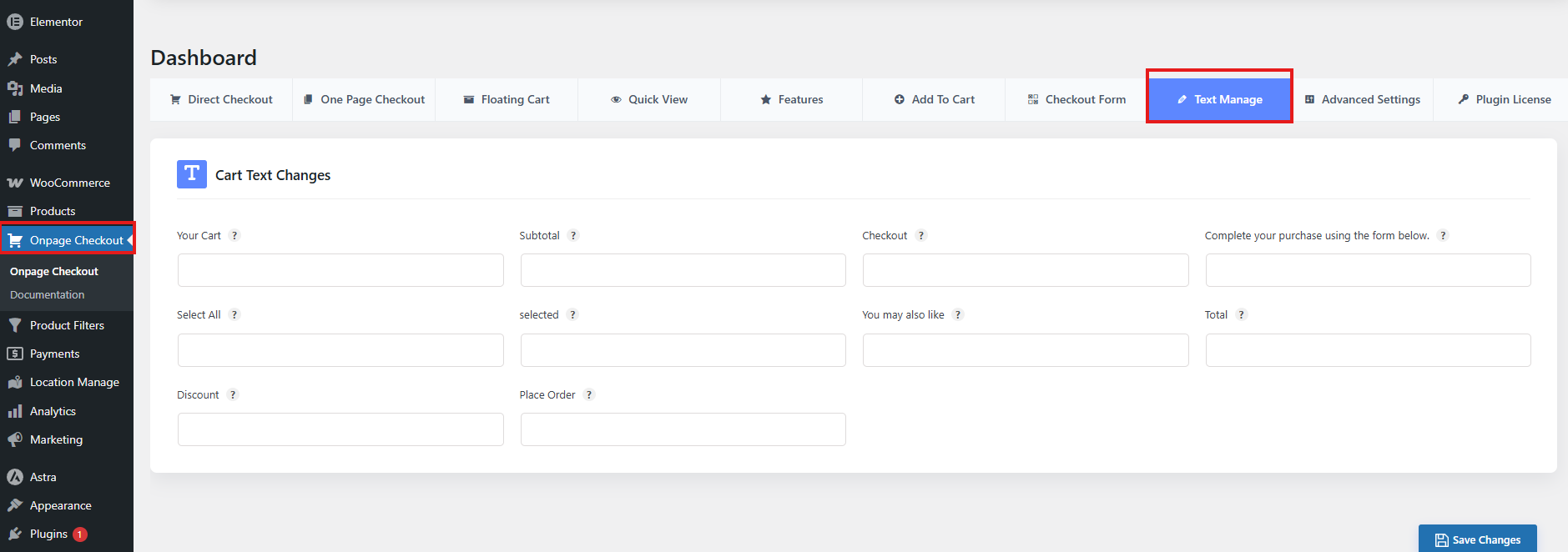
The Text Management feature allows administrators to customize and replace default checkout-related texts displayed on the One Page Quick Checkout page.
Cart Text Changes
This section provides input fields to modify commonly used checkout and cart labels.
Available Text Fields
- Your Cart This heading introduces the cart section where users review items before checkout. Changing it can set the tone — “Shopping Bag” feels more casual, “Order Summary” feels more formal. Use a label that matches your brand voice and customer expectations.
- Subtotal This label shows the sum of item prices before discounts, taxes, or shipping. You might rename it to “Items Total” for clarity, or “Order Subtotal” for a more professional tone. It helps customers understand what portion of the cost is just products.
- Checkout This section title signals the final step of the purchase. Alternatives like “Proceed to Payment” or “Complete Purchase” can make the process feel smoother. The supporting text (“Complete your purchase using the form below”) can be rewritten to guide users more clearly, e.g., “Enter your details to finalize your order.”
- Select All This action lets users quickly choose every item in a list. Depending on your tone, you could use “Choose All,” “Mark All,” or “Select Everything.” It’s especially useful in bulk actions like applying discounts or removing items.
- Selected This label indicates which items have been chosen. You could make it more descriptive, like “Chosen Items” or “Picked,” to reinforce clarity for users managing multiple selections.
- You may also like This phrase introduces product recommendations. Alternatives like “Recommended for You,” “Customers Also Bought,” or “You Might Love” can make upselling more engaging. The choice depends on whether you want a friendly or data-driven tone.
- Total This is the final amount after discounts, taxes, and shipping. You might rename it “Grand Total” or “Final Amount” to emphasize that it’s the complete cost. Clarity here reduces checkout confusion.
- Discount This label highlights savings applied to the order. Alternatives like “Savings,” “Promo Applied,” or “Special Offer” can make the discount feel more rewarding and personalized.
- Place Order This is the primary checkout action button — the most critical call-to-action. Options like “Confirm Purchase,” “Submit Order,” or “Buy Now” can change the urgency and tone. “Buy Now” is direct and fast-paced, while “Confirm Purchase” feels more formal and reassuring.
This enables better control over wording, localization, and branding without editing theme or plugin files.