
This section explains how to generate the API Key and Webhook Secret required for authenticating REST API and webhook requests.
Access Path
WordPress Admin → Multi Location Products →Settings →Advanced → API & Webhooks
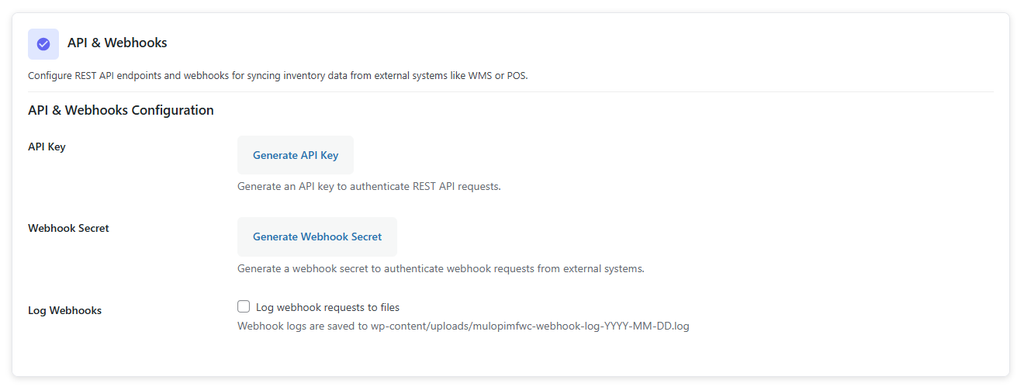
Steps
- Log in to the WordPress Admin Dashboard
- Navigate to Multi Location Products →Settings →Advanced
- Scroll to the API & Webhooks section
- Click Generate API Key (if no key exists)
- Copy the generated API key immediately
- Click Generate Webhook Secret (if no secret exists)
- Copy the generated webhook secret immediately
- Store both keys securely (they are displayed only once)
Important Note
- API keys and webhook secrets are shown only once for security reasons.
- If you lose either key, you must generate new ones.
- Previously generated keys will become invalid after regeneration.
Response Reference
{
  "api_key_location": "Displayed in the API Key field after generation",
  "webhook_secret_location": "Displayed in the Webhook Secret field after generation",
  "security_warning": "Keys are displayed only once for security. Copy them immediately.",
  "usage_api_key": "Use in X-API-Key header for REST API requests",
  "usage_webhook_secret": "Use in X-Webhook-Secret header for webhook requests"
}
Usage Summary
- API Key:
Used in REST API requests via theX-API-Keyheader. - Webhook Secret:
Used in webhook requests via theX-Webhook-Secretheader to verify authenticity.
Endpoint Reference
| Method | POST |
| Endpoint | /wp-json/mulopimfwc/v1/inventory/update |
| Required Header | X-API-Key |
| Content Type | application/json |