
All sections
POST /inventory/update PRO changes one product at one store. Send only the fields you want to change. Anything you leave out stays as it is.
All routes are PRO. Send your key in the X-API-Key header. A WordPress user with the right to manage WooCommerce, for example signing in with an application password, also works. Get the key from our guide to the API key and webhook secret.
Request
POST https://example.com/wp-json/mulopimfwc/v1/inventory/update
Content-Type: application/json
X-API-Key: YOUR_KEY

{
  "product_id": 456,
  "location_id": 3,
  "stock": 25,
  "regular_price": "39.99",
  "sale_price": "34.99",
  "backorders": "no",
  "disabled": false,
  "assigned": true
}
The fields
| Field | What it does |
|---|---|
product_id or sku | Required. The ID wins if you send both. A variation ID or SKU works. Grouped and external products are refused. |
location_id or location_slug | Required. The ID wins. |
stock | The stock. Decimals and negative numbers are allowed. |
regular_price, sale_price | 0 or more. Sending "" clears the price at that store. The sale price must be lower than that store’s regular price. |
backorders | no, notify, yes, on or off. "" uses the product’s own setting. |
disabled | true or false, or 1, 0, yes, no, on, off. |
assigned | The same values. Adds the product to the store, or removes it. |
Positive stock adds the product to that store automatically. Stock of 0 does not remove it. Draft products can be updated, but trashed ones return “Product not found.” For variable products, send the variation, because values on the parent do not appear anywhere.
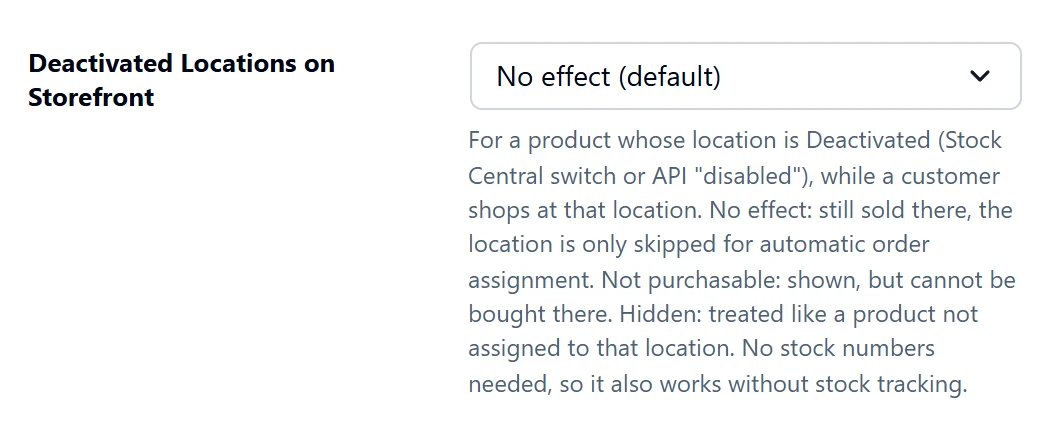
What disabled does for shoppers depends on Deactivated Locations on Storefront, under Product Visibility. By default it is No effect, so the product still sells. Choose Not purchasable or Hidden to change that.
Response
{
  "success": true,
  "message": "Inventory updated successfully.",
  "data": { "product_id": 456, "location_id": 3, "sku": "PROD-456", "assigned": true }
}
A problem returns 400 update_failed, with the reason in the message. A request without a JSON body returns “Each item must be an object.”
Backorders in plain words
| Value | Meaning |
|---|---|
no | Out of stock means it cannot be bought. |
notify | It can be bought, with a note that it is on backorder. |
yes | It can be bought, with no note. |
After an update, open the product in Stock Central to check the result.