
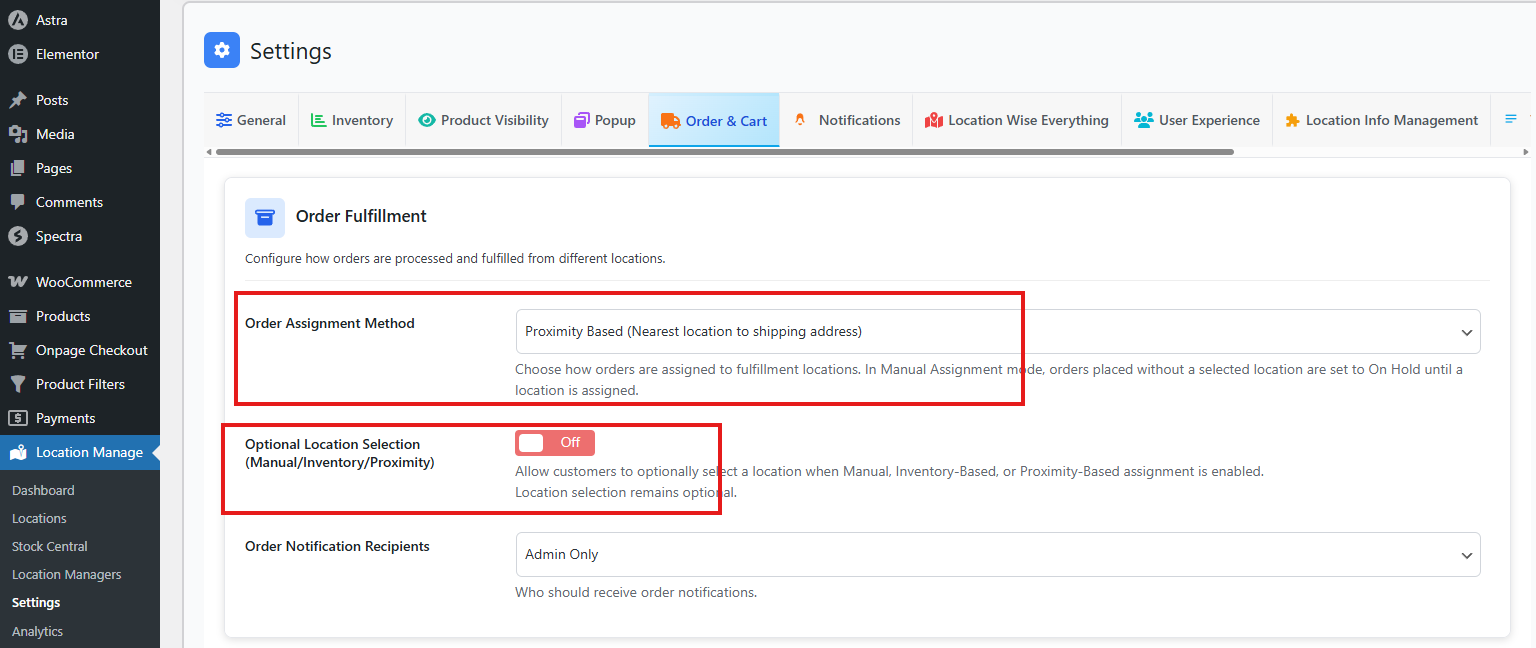
In this order assignment method, orders are automatically assigned to the geographically nearest fulfillment location based on the customer’s shipping address.
How to Access
To configure this feature:
- Go to Location Manage → Settings → Order & Cart
- Find Order Fulfillment
- Then, from Order Assignment method, choose Proximity Based
How It Works:
- The system uses the customer’s shipping address entered at checkout.
- Each location’s latitude and longitude are used to calculate distance.
- The order is assigned to the closest eligible location.
- Inventory is deducted only from the assigned location.
- Order notifications are sent based on the configured notification recipients.
Distance Calculation:
- Uses straight-line (geographical) distance based on coordinates.
- Requires accurate latitude and longitude for each location.
- Locations without valid coordinates are ignored.
Edge Cases:
- If multiple locations are at the same distance, the system selects one based on internal priority.
- If the shipping address is incomplete or invalid, the order follows the configured fallback behavior.
- If no nearby location has sufficient stock, the order may be placed On Hold or require manual assignment.
Best For:
- Fast local delivery
- Reduced shipping cost
- City-based or regional fulfillment models