
The Order Notification Recipients setting controls who receives notifications when an order is placed, assigned, or updated with a fulfillment location. This ensures the right people are informed at the right time for faster order processing.
How to Access
To configure this feature:
- Go to Location Manage → Settings → Order & Cart
- Find Order Fulfillment
- Then, from Order Notification Recipients, choose who should receive order notifications.
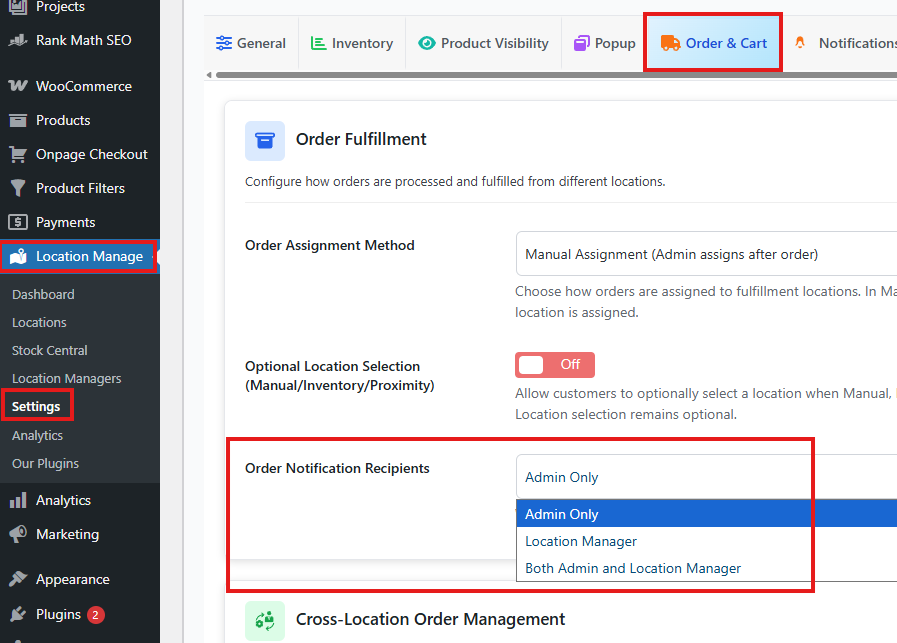
Available Options
1. Admin Only
- Order notifications are sent only to the site administrator.
- Location managers do not receive any order-related alerts.
Best For:
- Centralized order management
- Small teams with a single decision-maker
2. Location Manager
- Order notifications are sent only to the assigned location manager.
- Each location manager receives notifications for orders assigned to their location.
Best For:
- Distributed fulfillment teams
- Store-level order processing
- Faster local response times
3. Both Admin & Location Manager
- Order notifications are sent to both the site administrator and the assigned location manager.
- Provides full visibility across the organization.
Best For:
- Large operations
- Multi-location businesses
- Shared responsibility workflows
Notification Triggers
Notifications may be sent when:
- A new order is placed
- A fulfillment location is assigned or changed
- An order moves out of On Hold status
- Inventory is deducted for a location
Behavior Notes
- Location managers receive notifications only for their assigned locations.
- Works with both automatic and manual order assignment methods.
Notification delivery respects the configured email and system notification settings.