
The Auto-Populate Customer Addresses feature in the Multi Location Product & Inventory Management for WooCommerce plugin streamlines the checkout process by automatically filling in customer address details. Using APIs such as Google Places, this technology detects and suggests complete address information (city, state, zip code) as customers type. It also corrects errors in real-time, ensuring faster and more accurate order completion.
This feature enhances user experience by reducing manual input, minimizing mistakes, and speeding up checkout.
Benefits
- Faster checkout: Customers spend less time entering address details.
- Error reduction: Real-time suggestions prevent typos and incomplete addresses.
- Improved accuracy: Ensures shipping and billing details are correct.
- Enhanced customer satisfaction: Smooth checkout increases conversion rates.
How to Enable Auto-Populate Customer Addresses
Follow these steps to activate the feature:
- Log in to your WordPress Dashboard.
- Navigate to Location Manage > Settings > Order & Cart.
- Scroll down to the section named Checkout Settings.
- Locate the option Auto-Populate Customer Addresses.
- Enable the option by checking the box.
- Click Save Changes.
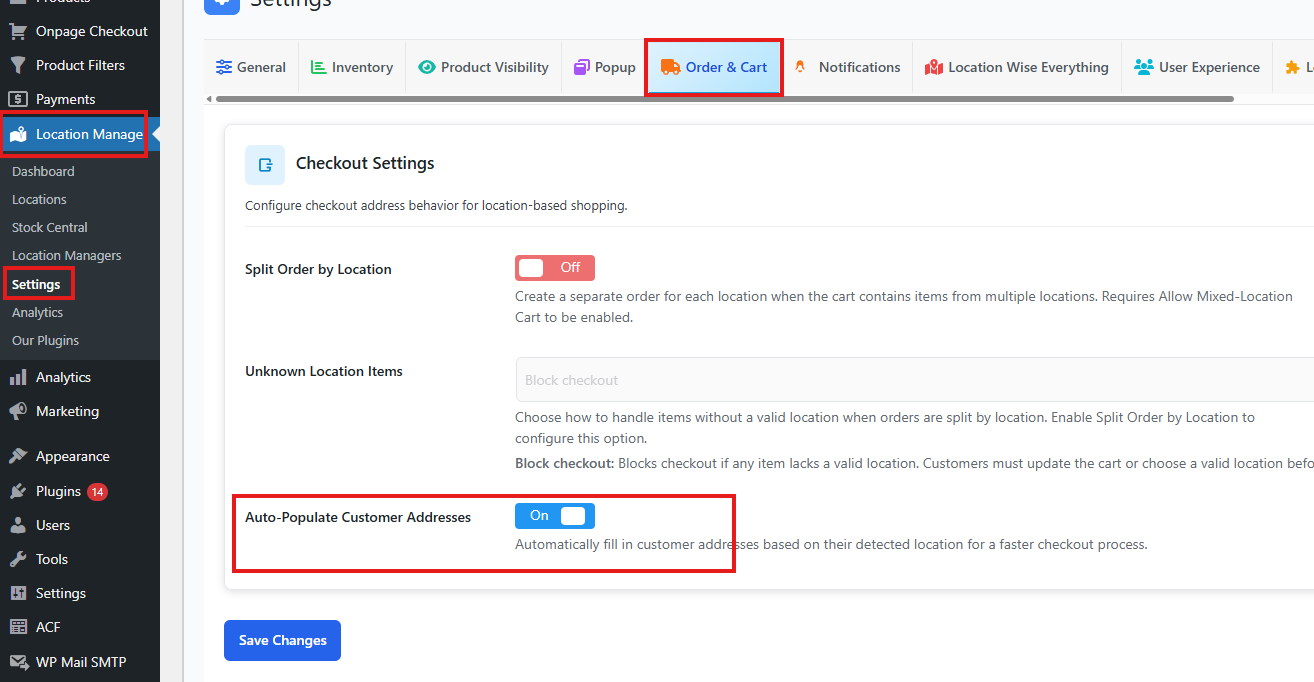
Once enabled, the plugin will automatically detect customer location and populate address fields during checkout. Customers will see suggested addresses as they type, making the process seamless and efficient.
Example Workflow
- A customer begins typing their street name.
- The plugin, via Google Places API, suggests the full address.
- The customer selects the correct suggestion.
- City, state, and zip code fields are instantly filled in.
The Auto-Populate Customer Addresses feature in Multi Location Product & Inventory Management for WooCommerce is a powerful tool to improve checkout speed, accuracy, and customer satisfaction. By enabling it, store owners can reduce cart abandonment and streamline order processing.